

Firecrawl.dev is a cutting-edge web scraping and crawling platform that turns any website into clean, structured data for AI and SEO applications. Launched via Y Combinator in 2025, Firecrawl has quickly gained traction among SEOs, content marketers, SaaS founders, and developers for its unique blend of developer-friendly API and AI-driven data extraction.
In this comprehensive review, we’ll analyze Firecrawl’s features in-depth – from blazing crawl speed and structured data output to its scraping quality, data exporting options, integrations, pricing, and real-world use cases. We’ll also compare Firecrawl vs Apify, its closest alternative, to see how Firecrawl performs across both developer and marketing scenarios.
Featured Snippet: What is Firecrawl.dev? Firecrawl.dev is an AI-powered web crawler and scraper that uses a serverless API to extract web content as markdown or JSON. It handles proxies, JavaScript, and anti-bot measures automatically, delivering LLM-ready data for applications like SEO audits, content research, and AI pipelines. In short, Firecrawl lets you crawl entire sites or scrape specific pages with minimal code – even using natural language prompts – and get clean structured output ready for analysis or AI models.
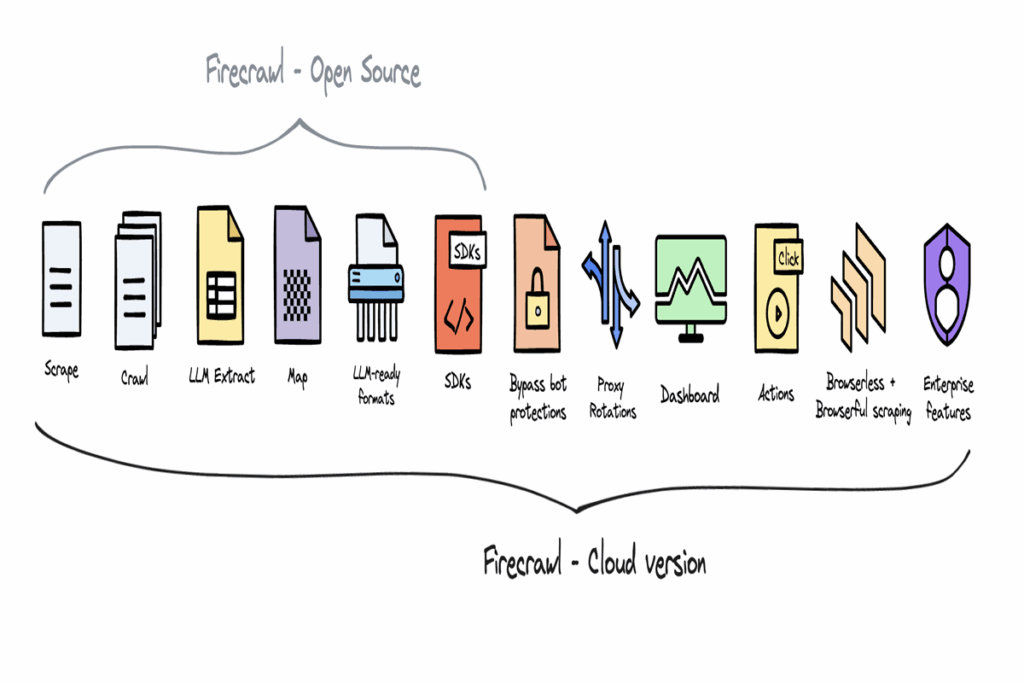
Featured Image: Firecrawl’s platform turns any website into LLM-ready data – ideal for both growth marketers and developers (Source: Firecrawl)
Key Features and Capabilities of Firecrawl.dev

Firecrawl packs a robust set of features that cater to both hardcore developers and non-technical users in marketing or SEO roles. Here’s an overview of its core capabilities:
- Scrape Single Pages: Extract content from a given URL in LLM-friendly formats (clean Markdown, HTML, JSON, etc.). The API returns structured results including text content and metadata like title, description, language, and more. You can even get screenshots of the page or raw HTML if needed.
- Crawl Entire Websites: Recursively crawl all accessible pages of a site from a starting URL, with controls for depth and link scope. Firecrawl automatically follows internal links (even without a sitemap) to gather every subpage’s data. This is powerful for site-wide SEO audits or knowledge base extraction.
- Map URLs: Quickly retrieve a list of all links/URLs on a website without scraping content. The
/mapendpoint returns an ordered list of discovered URLs, optionally filtered by keywords – great for content inventories or finding specific pages (e.g., all/blog/URLs). - Web Search & Scrape: A unique
/searchfeature (recently launched) lets you perform a web search via Firecrawl’s API and automatically scrape the top results in one go. Essentially, you input a query and Firecrawl returns full content for each search result – useful for “search engine SERP scraping” or competitor research without separate steps. This is LLM-ready web search for deep research and SEO analysis, all in one call. - AI Extraction (
/extract): Firecrawl’s flagship feature uses AI to extract structured data with natural language prompts. You can provide one or multiple URLs (even use wildcards likeexample.com/*for an entire domain) and a prompt describing the data you want (or a JSON schema), and Firecrawl will return clean JSON accordingly. This eliminates writing custom parsers – e.g. ask for “company name and mission” or “product prices and ratings” and get a neatly structured JSON response in one API call. It’s like having an AI data miner that understands your instructions.
Powerful Scraping Capabilities: Under the hood, Firecrawl handles the “hard stuff” so you don’t have to. This includes rotating proxies, anti-bot bypass, JavaScript rendering, and rate limiting. Dynamic, JS-heavy content is supported – Firecrawl intelligently waits for page content to load (via a “smart wait”) to ensure even SPA or infinite-scroll pages are fully captured. For sites with aggressive bot protection, a Stealth Mode can auto-retry with stealth proxies for better success (at a higher credit cost). These features mean reliable scraping with minimal failures, even on tricky websites. One user noted that Firecrawl is designed to get the data “no matter how hard it is” – a testament to its reliability-first approach.
Custom Actions and Interaction: Firecrawl isn’t limited to static page fetches. It supports browser automation actions like clicking, scrolling, typing, and waiting before extraction. This is crucial for scraping content behind logins or requiring navigation (e.g., auto-click “Load more” buttons). Firecrawl’s beta FIRE-1 agent even uses AI to navigate complex sites: you supply instructions (like “log in and scrape the dashboard data”) and the agent controls a headless browser to fulfill the task. This agentic approach opens possibilities to scrape content that normally needs multi-step interactions – bridging the gap between simple scraping and full UI automation.
Clean, Structured Output: A standout benefit of Firecrawl for SEO and content use cases is the clean output format. By default, Firecrawl returns the main page content as Markdown, excluding boilerplate like headers, footers, and nav menus. It uses smart content extraction (via statistical analysis and NLP) to filter out irrelevant elements, yielding a focus on the core text. You can enable onlyMainContent to enforce this and avoid clutter. The result is LLM-ready text that doesn’t require heavy cleaning – ideal for feeding into ChatGPT or analysis scripts. Moreover, the API can return structured data directly: for instance, specify formats=['markdown','json'] and you’ll get both human-readable text and a basic JSON of the page structure. Metadata like title, meta description, language, and even Open Graph tags are included automatically, which is gold for technical SEOs auditing on-page elements.
Firecrawl returns content in multiple formats. Here, an example search query is executed via Firecrawl’s API and yields a JSON result with page text and metadata – ready for analysis or feeding into an AI.
High Performance & Speed: Firecrawl is built for speed and scale. It uses a cloud-based, serverless architecture that can run many browser instances in parallel. Paid plans allow 5 to 100 concurrent browsers scraping simultaneously (depending on tier), enabling high throughput for large jobs. The developers have continuously optimized performance – a mid-2025 update improved crawl queuing and added concurrent scrapes, dramatically boosting throughput. In fact, some teams have benchmarked Firecrawl 50× faster than Apify in real-world agent tasks. For example, AgentOps (an AI agent framework) switched from Apify to Firecrawl after seeing an order-of-magnitude speedup in web scraping operations. Firecrawl also introduced a clever caching mechanism via the maxAge parameter: if you don’t need fresh data, Firecrawl can instantly return a cached result of a page it scraped recently. This can make repeat scrapes up to 5× faster, returning results in milliseconds instead of seconds. For fairly static content (docs, articles, etc.), this is a huge time saver – Firecrawl will only fetch new data if the cached version is older than your specified maxAge (say 1 hour). In short, Firecrawl’s web crawling speed is among the best in class, thanks to aggressive concurrency and smart use of caching.
Firecrawl emphasizes speed and AI integration. Above: a Firecrawl demo showing LLM-ready search results being fetched via API, illustrating the platform’s focus on quick data retrieval for AI agents.
Developer Experience (APIs & SDKs): As a developer-first tool, Firecrawl offers a clean REST API and multiple SDKs (Python, Node.js, Go, Rust, etc.). Getting started is straightforward: you just sign up for an API key (no credit card needed for free tier) and can invoke endpoints with cURL or your chosen SDK. The documentation is comprehensive, with quickstart guides and code examples. For instance, using Python, you can install firecrawl-py and do:
from firecrawl import FirecrawlApp
app = FirecrawlApp(api_key="YOUR_API_KEY")
result = app.scrape_url("https://example.com", formats=["markdown","html"])
print(result["data"]["markdown"][:200])  # first 200 chars of content
Within a few lines, you have the page content. The APIs also support batch operations (e.g. scrape multiple URLs in one request) both synchronously and asynchronously. Developers can poll batch jobs via job IDs for large crawls. Firecrawl’s open-source repository has garnered over 42k stars on GitHub – indicating a vibrant community – and it’s licensed under AGPL-3.0, meaning an open-core approach. You can even self-host the core scraping engine if needed (though advanced features like the LLM extraction likely require the cloud service). This open ethos contrasts with many closed SaaS scrapers and gives technical teams flexibility.
Integrations and Workflow: Firecrawl shines in integration scenarios, living up to its tagline as “the web crawling API for LLMs”. It’s already integrated with popular AI frameworks and developer tools like LangChain, LlamaIndex, Flowise, and Camel. For example, LangChain’s toolkit includes Firecrawl as a ready-made tool for agents to fetch web content. This makes it trivial to build AI that can browse the web. Additionally, Firecrawl provides a Zapier integration for no-code workflows. Marketers or growth hackers can set up Zaps to trigger Firecrawl on new Google Sheet rows, form submissions, etc., and pipe the data into spreadsheets, CRMs, or Slack without writing code. There’s also a point-and-click Playground UI on Firecrawl’s site where you can test scraping and extraction interactively. Coupled with a growing library of templates (pre-built recipes for common tasks like “Scrape and take a screenshot” or “Extract top restaurants from Yelp”), these features make Firecrawl accessible to non-developers. The usability is a major plus – even if you’re not comfortable coding, you can leverage Firecrawl via the Playground or Zapier for tasks like content research and lead generation.
Use Cases: Firecrawl for SEO, Content & Growth Marketing
One of Firecrawl’s strengths is serving a blend of developer and marketing use cases. Let’s explore how different roles can harness it:
- Technical SEO Audits: For SEO professionals, Firecrawl can crawl a site and extract key on-page elements for audit. With a single crawl, you could gather every page’s title tag, meta description, H1 heading, word count, etc., by using Firecrawl’s extraction capabilities. For example, prompt Firecrawl to “List all pages with missing meta descriptions” – it will crawl the domain and return structured results highlighting those pages (leveraging its ability to parse content and metadata). Its built-in respect for
robots.txt(as noted in docs) and smart rate limiting means it crawls politely by default. Firecrawl also handles international SEO scenarios by allowing location-based scraping (you can set country/language parameters to get country-specific versions of a page). Overall, it functions like a cloud-based Screaming Frog, but with AI extraction to pull custom data from pages beyond standard SEO fields. - Content Marketing & Research: Content teams can use Firecrawl to keep tabs on competitors or gather data for articles. For instance, you might scrape a competitor’s blog section to see their latest topics and extract summaries. Or use the
/searchAPI to fetch the top 10 Google results for a query, getting the full text of each result – then run an analysis or have an AI model identify common themes. This is powerful for content gap analysis and building outlines with real-time research. One user case: extracting quotes or stats from various sources – instead of manually visiting each source, Firecrawl could retrieve them all, and you filter through the Markdown for the relevant snippets. The “Deep Research” mode of using Firecrawl (cited on their site) is aptly named, as it lets you aggregate information quickly. And because Firecrawl returns data in structured JSON, you can easily feed it into Excel or visualization tools. Non-coders on the content team can trigger these scrapes via Zapier or the Firecrawl Playground UI, making it fairly user-friendly for marketers. - AI Knowledge Pipelines (LLM Retrieval-Augmentation): For AI developers building retrieval-augmented generation (RAG) systems or chatbots, Firecrawl is a godsend. Instead of maintaining your own scrapers, you can call Firecrawl’s API to fetch live data as needed – e.g., scraping a documentation site on-demand when a user asks a question. Because the output is cleaned Markdown, it slots right into prompt contexts. In fact, many are using Firecrawl with LLM agents; the Firecrawl team notes you can “Power your AI assistants with real-time web content”. The platform was essentially built with this use case in mind. Firecrawl even has a dedicated MCP (Model-Content-Provider) server mode to integrate with tools like OpenAI’s functions or AI coding assistants (so an LLM can invoke Firecrawl to grab data autonomously). All these make it a top choice for any AI application that needs up-to-date or niche web data. Notably, one developer reported Firecrawl’s efficiency allowed them to use GPT-3.5 Turbo instead of GPT-4 for a data extraction task, by reducing the tokens needed by 2/3 – saving time and cost. That highlights how cleaning and structuring data via Firecrawl can streamline AI pipelines.
- Growth Marketing & Lead Generation: Firecrawl’s ability to turn websites into structured data with prompts is extremely useful for growth hackers. You can feed it a list of company homepage URLs and ask for “contact email and phone number” or “founder’s name and LinkedIn” – and get a JSON list of leads. It automates what growth teams often do manually or with patchwork scrapers. The lead enrichment use case is explicitly mentioned by Firecrawl. For example, if you have a spreadsheet of prospects with website URLs, a Zapier integration could call Firecrawl’s
/extractfor each and fill in columns like industry, company size, etc., pulled from their site. Another scenario is content aggregation: Firecrawl could gather reviews or testimonials from multiple sites for market research. And because it can monitor changes (with a “change tracking” option in the API), you might set it to watch product pages for price changes, competitor news pages for updates, etc., feeding your growth team timely intel. Essentially, Firecrawl provides serverless web scraping for growth – no infrastructure to manage, just the data you need on demand.
Firecrawl vs Apify: How Does It Compare?
It’s natural to compare Firecrawl with Apify, a well-established web scraping platform. Both allow you to collect web data at scale, but they take very different approaches suited to different users. Here’s a breakdown of Firecrawl vs. Apify on key points:
- Speed and Performance: Firecrawl’s architecture yields extremely fast scrapes, as evidenced by user benchmarks (50× faster in certain agent workflows). It returns data in real-time via API, whereas Apify often runs scraping jobs as containerized “actors” which introduce overhead. Apify can be plenty fast for many uses, but its jobs may need to spin up and may not match Firecrawl’s snappy response for on-demand requests. Firecrawl also has built-in caching (
maxAge) that speeds up repeat scrapes by ~5×, something Apify doesn’t natively offer at the API level. - Data Output & AI Integration: Firecrawl is explicitly designed to output clean text or JSON ready for AI models. It automatically strips boilerplate and can use AI to structure data with a prompt. Apify, on the other hand, gives you whatever your scraper code collects – typically raw HTML or JSON per your parsing logic. Achieving the same level of “cleanliness” on Apify requires custom coding or using community actors (some actors on Apify Store might, for example, scrape article text, but it’s case-by-case). For building AI pipelines, Firecrawl is more plug-and-play; Apify would require integrating an LLM or cleaning step separately. Indeed, Apify has recognized the trend and started highlighting “web data for generative AI” in its materials, but it largely relies on you to prepare the data.
- Ease of Use vs Flexibility: Firecrawl favors ease of use – minimal configuration, natural language extraction, and no-code options. It excels if you want quick results with little coding. Apify offers greater flexibility for complex scenarios. Apify is essentially a platform to run any custom Node.js/Python scraping code (they provide the Crawlee library for writing scrapers). This means if you have a very specific scraping flow (login, solve CAPTCHA via 3rd-party service, scrape, store to a database), Apify can handle it by writing or using an actor. Firecrawl’s feature set covers a lot (even interactions and login via agent), but there could be edge cases where a tailored Apify actor is needed. For instance, a site with a sophisticated anti-bot CAPTCHA might defeat Firecrawl’s stealth mode. In one Reddit discussion, a user noted Firecrawl struggled with a certain anti-bot measure, whereas a custom Apify approach succeeded. These cases are rare, and Firecrawl constantly improves, but hardcore web scraping experts might still prefer Apify for its do-it-yourself openness on tough targets. Conversely, for most users who don’t want to write and maintain scrapers, Firecrawl’s automated approach is a clear winner – “no fragile scrapers required,” as the founders put it.
- Platform & Ecosystem: Apify has been around longer and has a rich ecosystem – a public Actor Store with hundreds of ready-made scrapers (e.g., for Amazon, Twitter, Google Maps, etc.), plus a large community. Firecrawl, being newer, doesn’t have a marketplace of pre-built solutions – but its AI extraction often negates the need for site-specific scrapers. In practice, if a specific Apify actor exists for your task (say “Amazon Price Scraper”), that could be a quick win on Apify. Firecrawl could also scrape Amazon pages, but might need careful prompt or might hit bot blocks (Amazon is notoriously hard, often needing rotating residential proxies). Apify also offers scheduling, dataset storage, and result streaming out of the box. Firecrawl is more of a raw API – you handle scheduling (could be via cron or Zapier) and storing data (though Firecrawl can POST results to your webhook for processing). So, Apify is a full scraping platform, whereas Firecrawl is a focused scraping service. Depending on your needs (end-to-end workflow vs. on-demand data for AI), one may fit better.
- Pricing Model: The pricing between Firecrawl and Apify differs significantly. Firecrawl uses a credit-based model tied largely to pages scraped, while Apify charges by compute units (CU) and monthly subscription. Firecrawl’s plans start with a Free tier (500 credits one-time) and affordable Hobby plan ($16/mo for 3,000 pages). Its Standard plan at $83/mo includes 100k credits (~100k pages). These credits correlate pretty directly to pages or search results (1 credit per page scraped or per search result, etc., with some features costing a few extra). This straightforward “per page” pricing is easy for content teams to budget. Apify, on the other hand, uses a usage credit system: e.g., the $39/mo Starter plan gives you $39 of platform credit, roughly equivalent to 97 compute units at $0.4/CU. A compute unit is basically CPU-time and memory usage – approximately, running a scraping task for 1 hour on 1GB RAM ~ 1 CU. This can be a bit abstract: scraping 100 pages might use a fraction of a CU or several, depending on the complexity and runtime. In simpler terms, Apify’s effective page cost varies by the scraper efficiency, whereas Firecrawl’s cost per page is fixed. For many scenarios, Firecrawl will be more cost-efficient (and predictable) – you pay, say, ~$0.00083 per page on Standard plan (100k pages for $83) and there are no additional proxy fees. Apify might end up more expensive if your scrapers are heavy or require pricey proxies (Apify offers proxy add-ons at extra cost). However, Apify’s free tier ($0 with $5 credit each month) might allow some small-scale scraping at no cost if within 5 CU (though that’s limited). Both platforms have enterprise options – Firecrawl even offers unlimited credits on custom enterprise plans, and Apify has a $999/mo Business plan or custom deals.
In summary, Firecrawl vs Apify comes down to this: Firecrawl is ideal if you want speed, simplicity, and AI-ready data without managing infrastructure – it’s like a smart scraping assistant. Apify is better if you need full control, custom scripting, or existing scrapers and don’t mind the coding and maintenance overhead. Many users are now gravitating to Firecrawl for modern AI-driven use cases, given reports of huge speed gains and reduced dev effort. As one developer put it, after using Firecrawl, traditional scraping felt like “Star Trek: The Next Generation compared to the original series” – a big leap forward in ease and capability. That said, it’s always wise to choose the tool that best fits your specific project’s needs and team skills.
Pricing and Plans
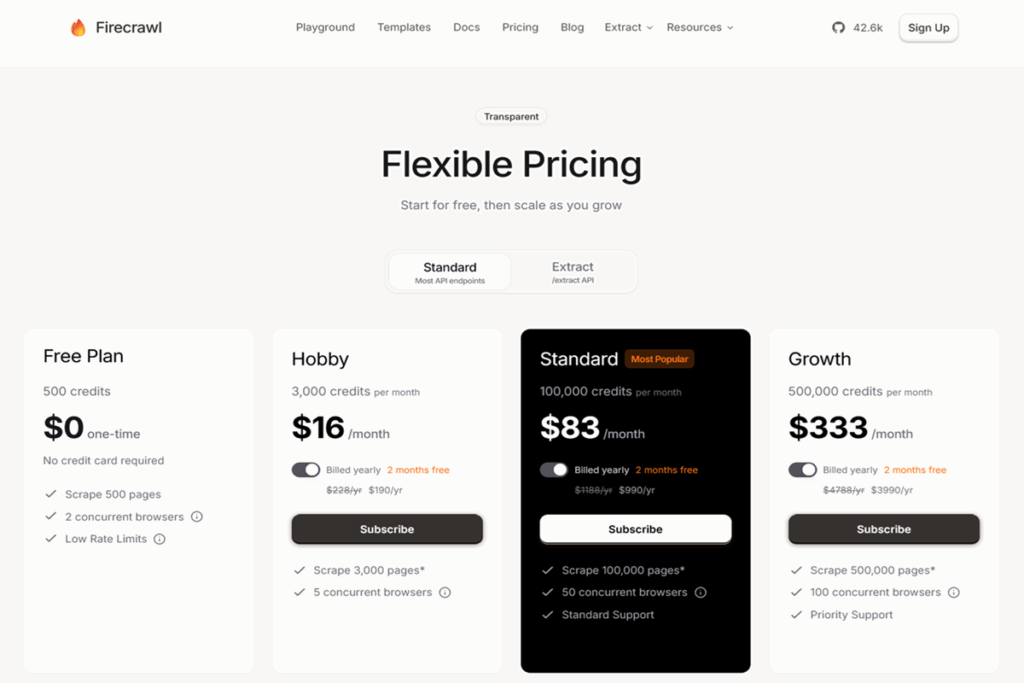
Firecrawl’s pricing is transparent and scalable. Here’s a quick overview (as of 2025):
- Free Plan: $0 – includes 500 credits (one-time) which equates to ~500 pages or API calls, and up to 2 concurrent browsers. This is a generous free trial to test the service. No credit card required.
- Hobby Plan: $16/month (billed annually at $190/yr) – includes 3,000 credits per month, 5 concurrent browsers. Good for small websites or occasional scraping needs (roughly up to 100 pages a day).
- Standard Plan (Most Popular): $83/month (annual $990/yr) – includes 100,000 credits per month, 50 concurrent browsers, and standard support. This plan is aimed at heavy users (up to 100k pages a month covers quite large crawls or frequent use).
- Growth Plan: $333/month (annual $3,990/yr) – 500,000 credits per month, 100 concurrent browsers, priority support. Suited for enterprise-level scraping (half a million pages/mo) or powering AI features in a production app.
- Enterprise: Custom pricing – unlimited credits, higher rate limits and concurrency, dedicated proxy pools (“Improved Stealth”), SLAs, and advanced security options. Essentially, if you need to scrape at massive scale or have special requirements, Firecrawl’s team will work out a plan.
Credits cover most API endpoints on a 1 credit per page or result basis. The one exception is the /extract endpoint: because it involves AI processing (tokens), its usage is metered differently. During open beta, Firecrawl offered 500k free AI tokens for extraction – going forward, expect extraction to consume credits proportional to the content size or tokens processed (Firecrawl has a credits-to-tokens table in docs). In practice, for moderate prompts, the costs have been reasonable, but if you try to extract thousands of pages in one go via AI, it will use up more credits.
It’s worth noting failed requests do not charge credits – if Firecrawl can’t get the data (e.g., blocked site), you aren’t billed for that attempt (per their FAQ). This is reassuring for users concerned about hitting paywalls or blockages.
Comparatively, Apify’s pricing starts with a Free tier (includes $5 usage credit ≈ 12.5 CU/mo) and a Starter at $39/mo for 97.5 CU at $0.4/CU. For reference, scraping 100k pages on Apify could cost anywhere from ~$300 to $600+ depending on efficiency (or require a higher plan) – so Firecrawl’s $83 for 100k pages is quite competitive. Of course, Apify’s credits can also be spent on their proxy service or pre-built actors, whereas Firecrawl includes all that in the page credit.
Value for Money: If your goal is to gather lots of content for SEO or AI usage, Firecrawl’s pricing delivers great value and predictability. You’re essentially paying by results, not by how long the scraper runs or how complex it is. Many SEO agencies and SaaS teams will appreciate this straightforward model (no surprises). And if you run out of credits, Firecrawl offers auto-recharge add-ons ($11 for each +1000 credits auto top-up) or one-off credit packs ($9 per 1000 credits). This makes scaling usage up or down flexible.
Final Verdict and Recommendation
Firecrawl.dev has emerged as a game-changing web scraping tool that bridges the needs of both developers and marketers. It brings the muscle of a cloud scraping infrastructure with the brains of AI-driven extraction. Our analysis found Firecrawl to excel in:
- Crawling & Speed: It’s exceptionally fast and handles large-scale crawls with ease (concurrency and caching give it an edge). This means quicker SEO audits and real-time data for AI applications without long waits.
- Data Quality: Firecrawl delivers clean, structured information. For content and SEO tasks, having ready-to-use Markdown or JSON saves countless hours of cleaning HTML. The ability to target exactly what data you want via a prompt is incredibly powerful and mostly unique to Firecrawl.
- Ease of Use: From the intuitive API/SDKs to no-code integrations, Firecrawl lowers the barrier to entry for web data extraction. You don’t need to be a scraping expert or maintain custom scripts – it’s largely maintenance-free scraping. This lets teams focus on using the data, not collecting it.
- Versatility: We saw how one platform can serve diverse scenarios – technical SEO audits, AI knowledge base building, competitor analysis, or lead generation – with just configuration changes. The blend of developer features (like browser actions, API control) and AI features (like semantic parsing) is where Firecrawl stands out in a crowded field.
On the flip side, no tool is perfect. In extremely specialized cases (like scraping a site that absolutely requires custom human-like steps or specialized CAPTCHA solving), a custom solution or Apify actor might outperform. Also, Firecrawl is evolving fast, so occasional beta quirks can happen – but the team is very responsive (as evidenced by user feedback implementing new features within hours). They also actively engage on forums and Discord to support users.
Bottom line: Firecrawl.dev is a top choice in 2025 for anyone who needs web data and values their time. It’s particularly ideal for AI-driven projects and modern SEO needs, where getting structured, reliable data quickly can provide a competitive advantage. Firecrawl effectively turns the web into an on-demand database you can query with code or natural language.
If you’re ready to supercharge your web scraping workflow – whether you’re a growth marketer looking to enrich leads or a developer building the next AI chatbot – Firecrawl is absolutely worth a try. The free tier allows you to test it risk-free on your own use cases. Given our positive findings, we recommend Firecrawl.dev as a must-have tool in the arsenal of data-driven SEO and AI teams.
👉 Try Firecrawl.dev for free and see the results yourself: Get 500 free credits here (affiliate link). With its combination of speed, smarts, and simplicity, Firecrawl might just become your go-to solution for scraping the web in the era of AI.