

Technical SEO has become increasingly complex in today’s digital landscape. As websites grow more sophisticated, manually checking thousands—or even millions—of URLs becomes virtually impossible.
That’s where automation tools like Screaming Frog SEO Spider become invaluable for serious SEO professionals.
This comprehensive guide explores fifteen advanced Screaming Frog techniques that will transform your technical SEO audits, save countless hours, and uncover critical issues that would otherwise remain hidden. Whether you’re working with JavaScript-heavy sites, complex e-commerce platforms, or enterprise websites, these strategies will elevate your technical SEO game.
Understanding Screaming Frog’s True Power
Screaming Frog SEO Spider is far more than just a website crawler. It’s a sophisticated technical SEO platform that, when properly configured, can automate complex auditing tasks while providing deep insights into your website’s health.
The difference between basic and advanced usage comes down to knowing how to configure the tool for specific scenarios and leveraging its custom features to extract precisely the data you need.
1. Crawl Large Sites Using Database Storage Instead of RAM
Challenge: When crawling large websites, Screaming Frog’s default RAM storage mode often runs into memory limitations, causing crashes or incomplete crawls.
Solution: Switch to database storage mode to handle massive websites efficiently.
Screaming Frog uses your computer’s RAM to store crawl data by default. While this provides speed, it creates a significant bottleneck when analyzing large websites with thousands of pages. The database storage alternative allows you to overcome this limitation.
To enable this feature:
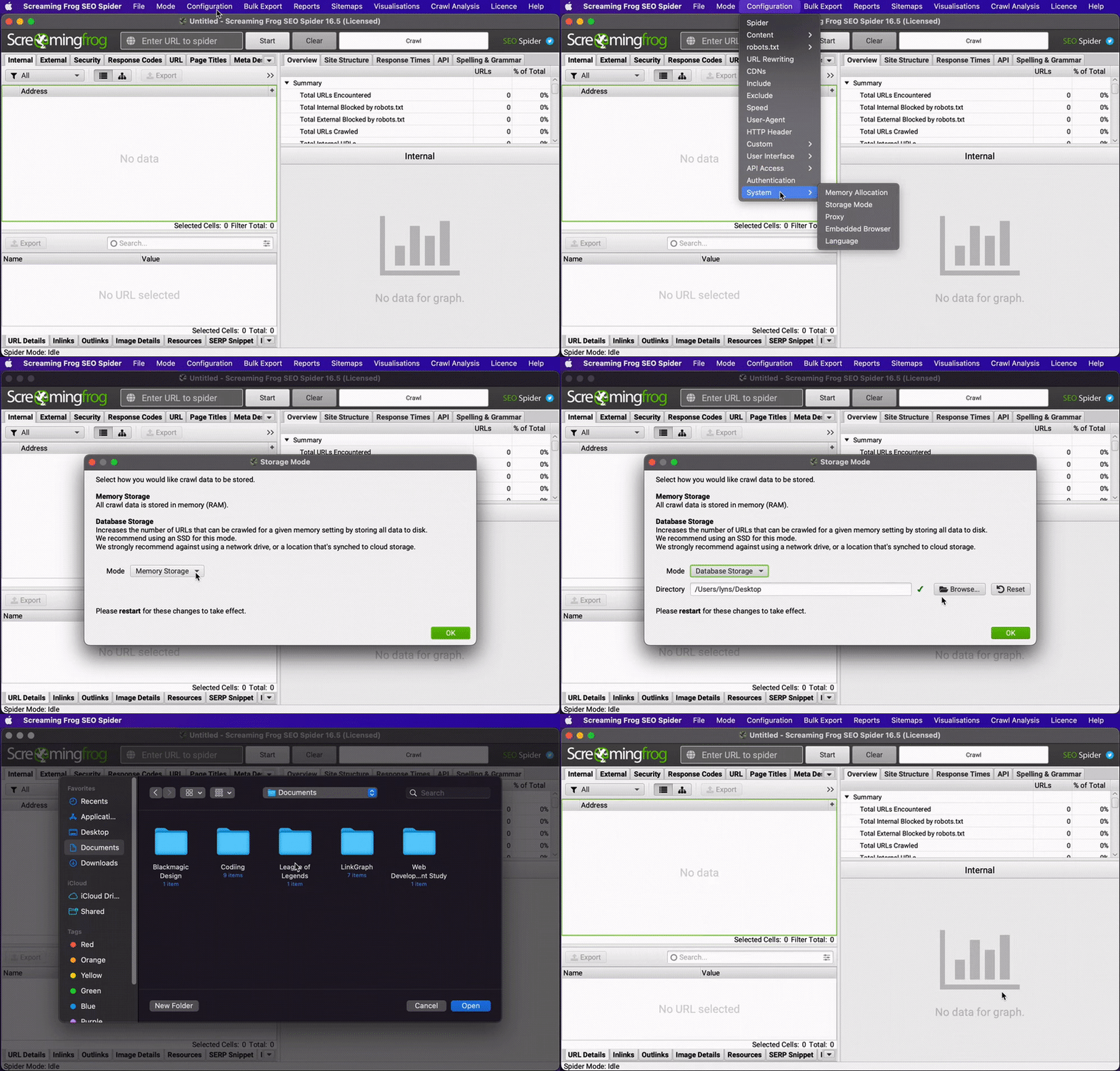
- Navigate to Configuration > System > Storage Mode
- Select “Database Storage” from the dropdown menu
- Choose a storage location with sufficient space
This simple change allows you to crawl virtually unlimited URLs without running into memory constraints. For websites with solid-state drives (SSDs), the performance difference is negligible, but the crawling capacity increases dramatically. This means you can analyze entire enterprise websites in a single crawl without crashes or incomplete data.
2. Master JavaScript Rendering to Find Critical Indexing Issues
Challenge: JavaScript-heavy websites often hide content from search engines or load it after the initial HTML render, creating potential indexing problems.
Solution: Leverage Screaming Frog’s JavaScript rendering capabilities to compare rendered versus non-rendered content.
Modern websites frequently rely on JavaScript to display critical content. Google can eventually render this JavaScript, but it’s a two-phase process that can delay indexing or miss content entirely.
To identify JS-dependent content:
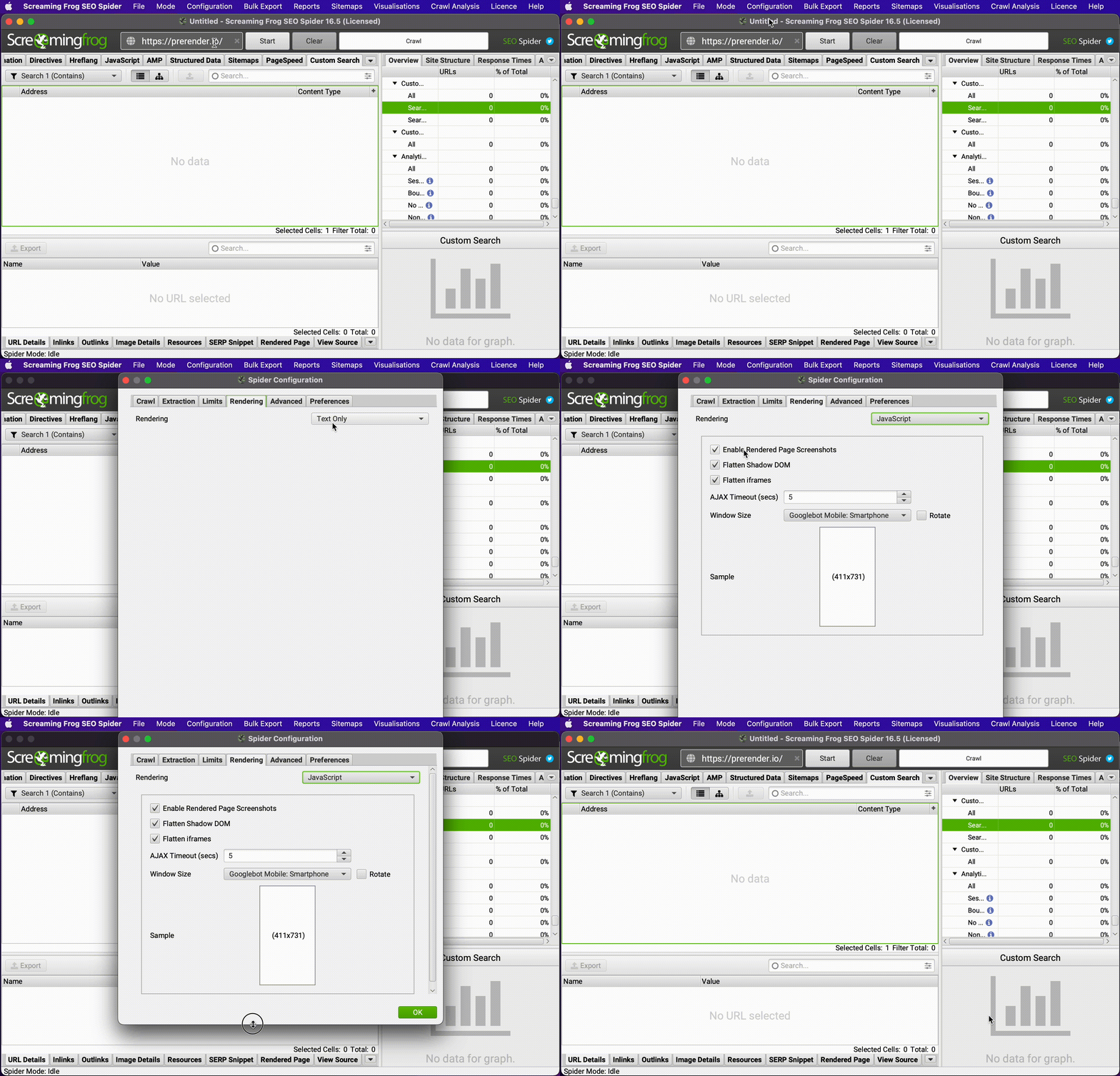
- Go to Configuration > Spider > Rendering
- Select “JavaScript” from the dropdown
- Check “Enable Rendered Page Screenshots”
- Run your crawl
- Compare the “HTML” versus “Rendered HTML” tabs for important pages
This analysis helps identify content that only appears after JavaScript execution—a potential SEO liability. For JS-heavy sites, consider implementing server-side rendering or a prerendering solution to ensure all content is immediately available to search engines.
3. Audit Redirect Chains During Site Migrations
Challenge: Website migrations often involve complex redirect patterns that can lead to lost traffic if implemented incorrectly.
Solution: Use Screaming Frog’s list mode to verify redirect implementations during and after migrations.
Site migrations represent one of the riskiest SEO operations. Verifying that each URL properly redirects to its new destination is critical but nearly impossible to do manually at scale.
For comprehensive redirect auditing:
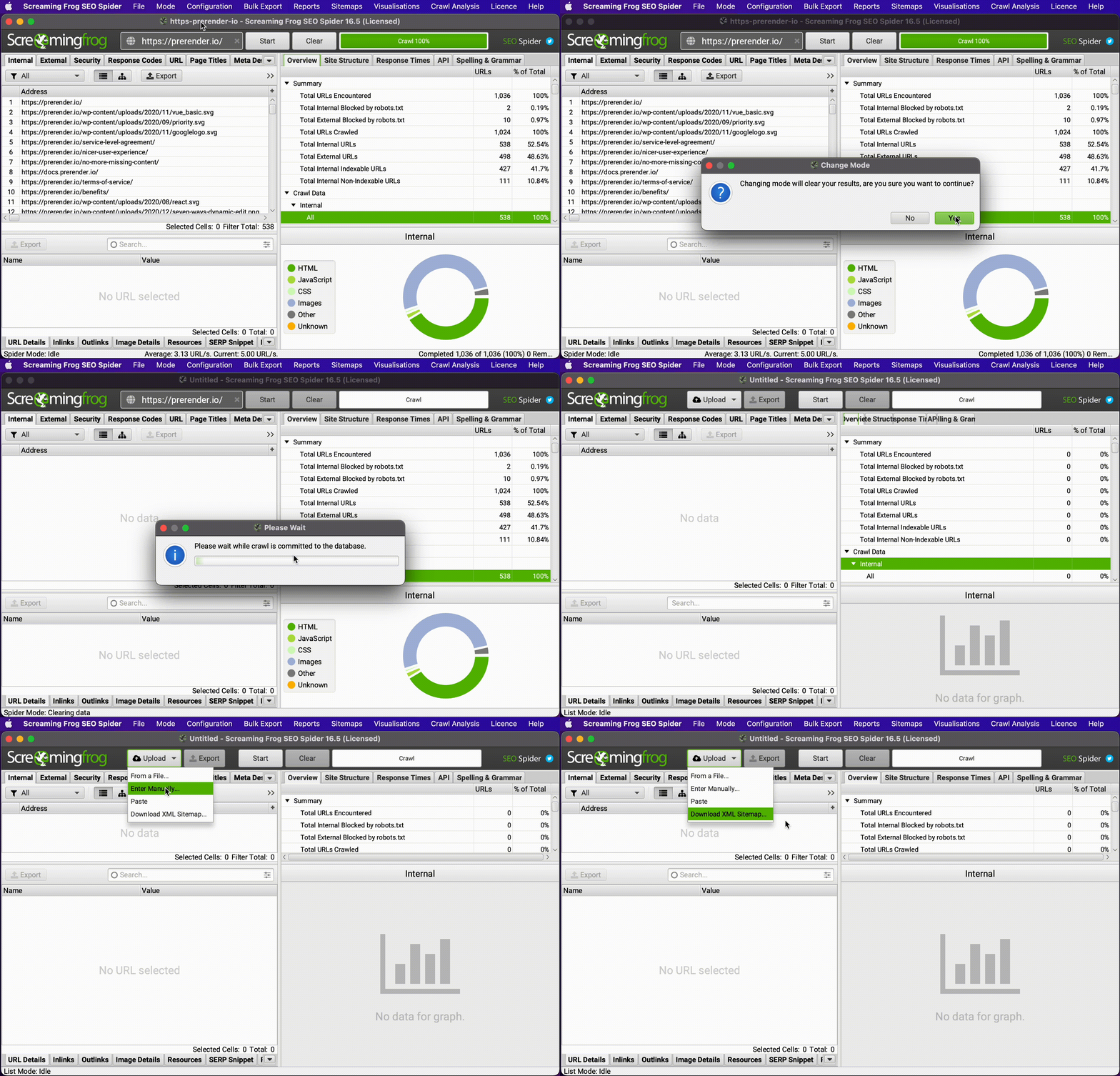
- Switch to Mode > List
- Upload a CSV of your old URLs
- Under Spider > Advanced, check “Always Follow Redirects”
- Start your crawl
- When complete, go to Reports > Redirects > All Redirects to export a comprehensive redirect report
This analysis identifies chains, loops, and broken redirects that would otherwise go unnoticed until they impact your traffic. For enterprise sites, combine this with custom extraction to verify URL parameter handling, locale redirects, and other complex patterns.
4. Implement Advanced RegEx Patterns to Target Specific URL Sections
Challenge: Crawling entire websites is often inefficient when you need to focus on specific sections or patterns.
Solution: Use RegEx expressions in the Include/Exclude configuration to precisely target the URLs you need to analyze.
When working with large websites, focusing your crawl on specific sections:
• Saves valuable processing time • Provides more relevant, focused data • Reduces noise from irrelevant URLs
Regular expressions (RegEx) allow you to define precise patterns for inclusion or exclusion.
To implement targeted crawling:
- Go to Configuration > Include or Configuration > Exclude
- Use patterns like:
https://example.com/blog/.*to only crawl blog contenthttps://example.com/products/[^/]+/?$to only crawl product category pages.*?(.*&)?utm_.*to exclude all URLs with UTM parameters
This targeted approach not only accelerates crawls but empowers you to conduct specialized audits of specific site sections without the noise of irrelevant URLs.
5. Use Custom Extraction to Find Hidden Technical Issues
Challenge: Standard crawls miss specialized technical issues or specific implementation problems unique to your website.
Solution: Leverage custom extraction to pull precisely the data you need for specialized analysis.
Screaming Frog’s custom extraction feature is perhaps its most powerful yet underutilized capability. It allows you to extract specific elements or data from each page using CSS selectors, XPath, or RegEx.
For advanced technical audits:
- Go to Configuration > Custom > Extraction
- Add extractors for critical elements like:
- Product pricing elements to verify dynamic pricing implementation
- User-generated content sections to check for indexing controls
- Structured data elements to verify correct implementation
- A/B testing scripts to identify potential cloaking issues
For e-commerce sites, this can be particularly valuable for identifying product pages with missing reviews, improperly formatted prices, or incomplete specifications—all factors that impact both user experience and search performance.
6. Integrate with Analytics and Search Console for Performance Context
Challenge: Crawl data alone lacks the context of how pages actually perform in search.
Solution: Connect Google Analytics, Search Console, and other data sources to add performance metrics to your technical findings.
Screaming Frog allows API connections to major data sources, creating a unified view of technical issues and their real-world impact. This integration helps prioritize fixes based on how they affect actual traffic and conversions.
To implement this integration:
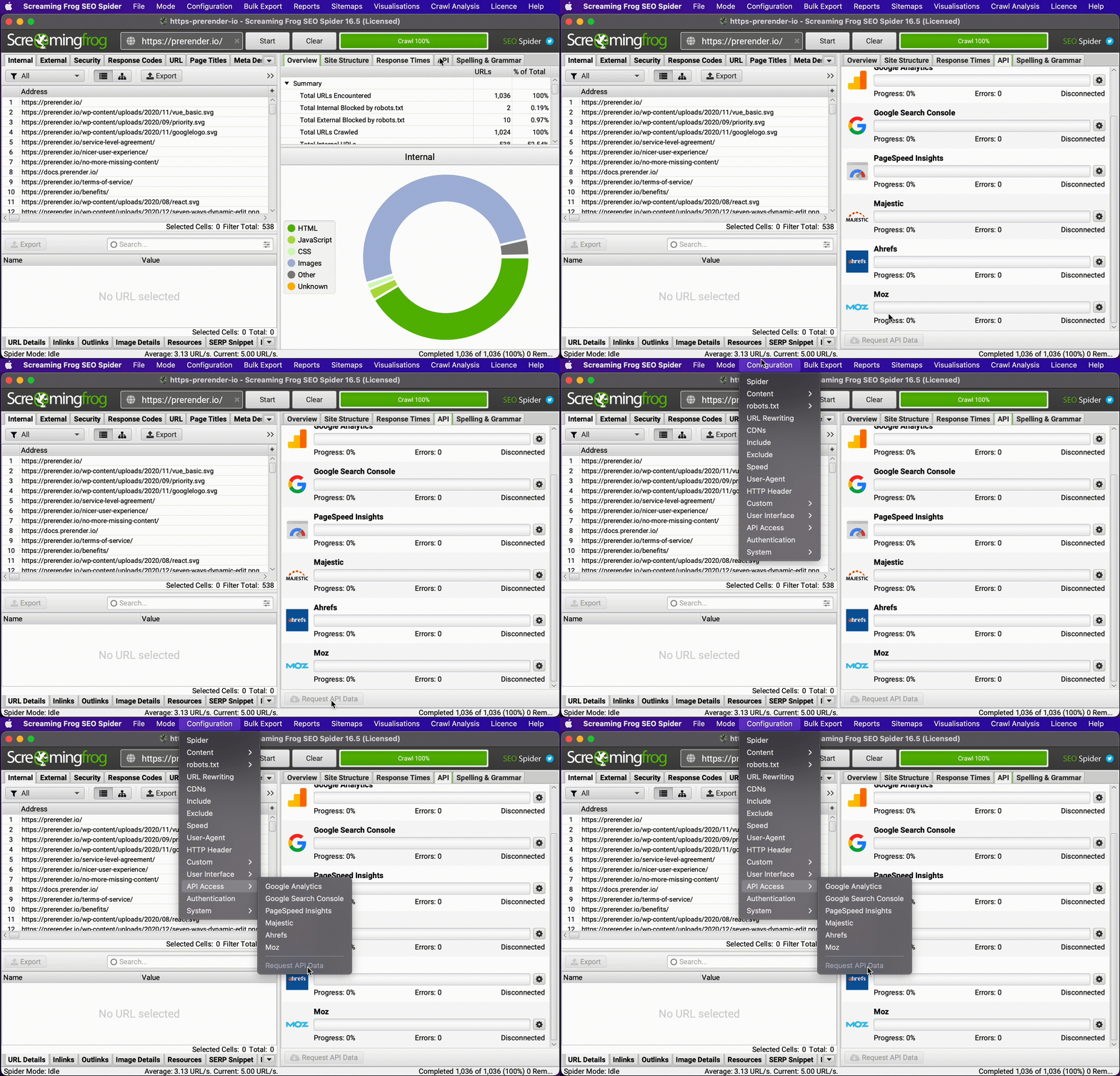
- Go to Configuration > API Access
- Set up connections to Google Analytics, Search Console, PageSpeed Insights, etc.
- Run your crawl with these integrations
- Use the Request API Data button to retroactively add this data to existing crawls
This creates a powerful context for prioritization. A minor technical issue on a high-traffic, high-conversion page becomes a top priority, while more significant issues on rarely-visited pages might be addressed later.
7. Verify Structured Data Implementation at Scale
Challenge: Structured data inconsistencies are common across large websites, but checking each page manually is impractical.
Solution: Use Screaming Frog’s structured data validation to automatically verify implementation across your entire site.
Structured data helps search engines understand your content and can enable rich results, but errors or inconsistencies are common, especially on large sites.
To audit structured data implementation:
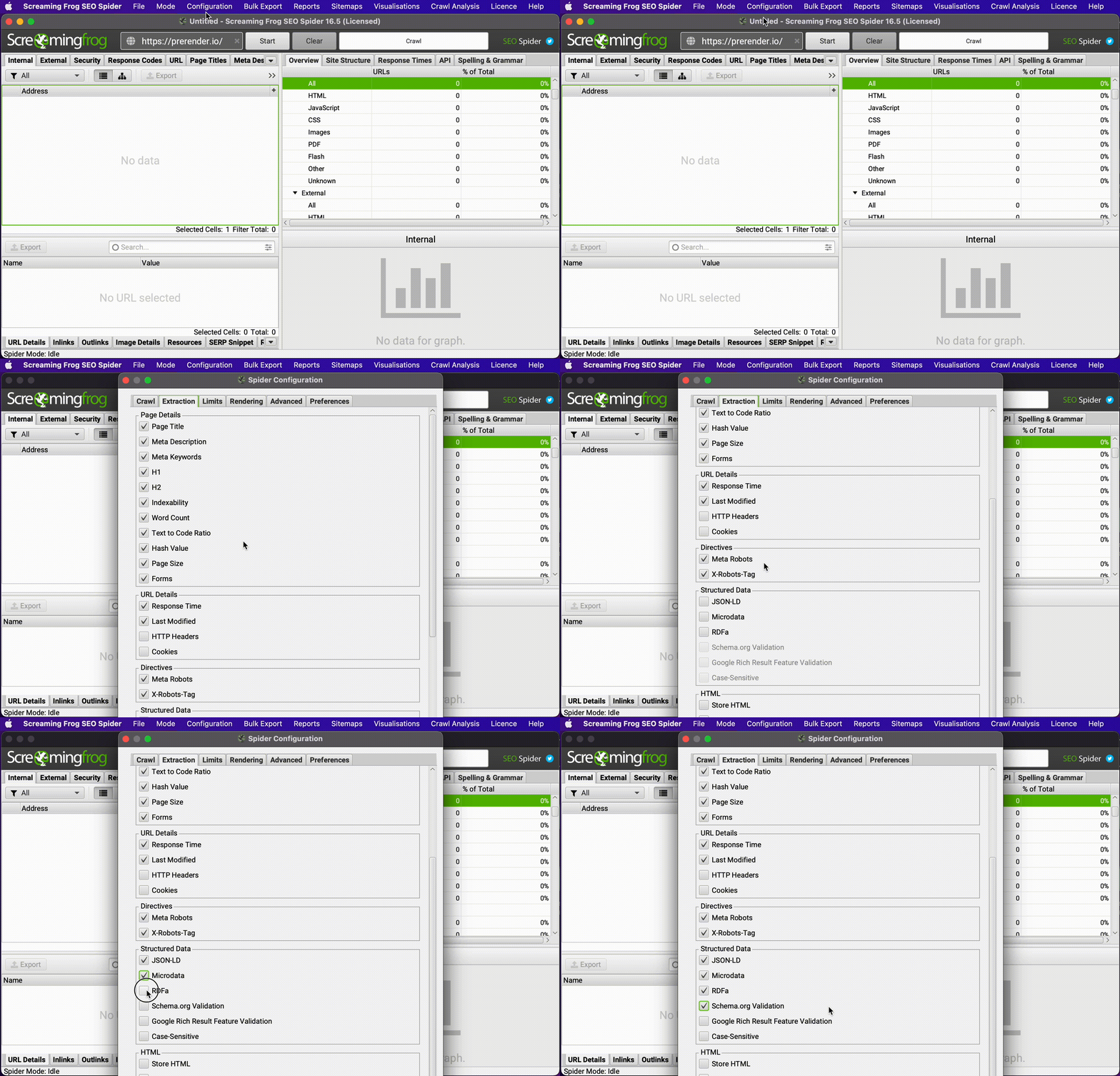
- Go to Configuration > Spider > Extraction
- Check “Structured Data” and select the formats used on your site
- Run your crawl
- Navigate to the “Structured Data” tab to see validation results
- Export a report of all errors via Reports > Structured Data
This automated validation identifies schema.org errors (like missing required properties), warnings (such as recommended properties that are absent), and implementation inconsistencies across your site, helping you ensure proper structured data implementation that can drive rich results in search.
8. Use Link Score Algorithm for Internal Linking Optimization
Challenge: Identifying which pages need internal linking improvements is difficult without understanding your site’s current link equity distribution.
Solution: Leverage Screaming Frog’s Link Score feature to visualize internal link equity distribution.
Internal linking distributes authority throughout your site, but optimizing this structure requires understanding your current link architecture.
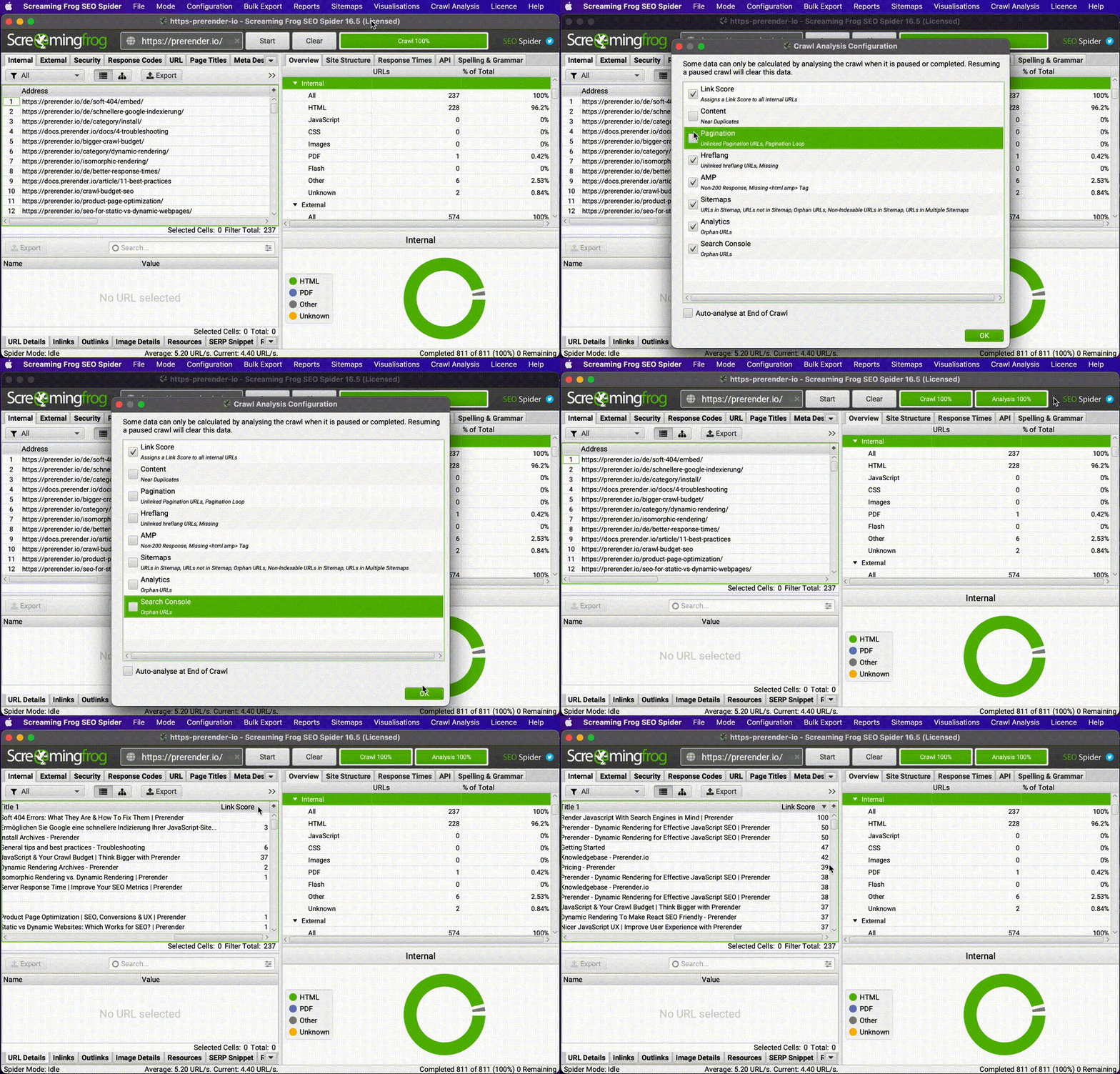
To analyze internal link equity:
- Run a complete site crawl
- Go to Crawl Analysis in the menu
- Click “Start” to generate the analysis
- When complete, check the “Link Score” column in the Internal tab
This analysis helps identify important pages with insufficient internal links, orphaned content, and opportunities for improved site architecture. For large sites, combine this with PageRank data (if available) for even more sophisticated prioritization.
9. Find and Fix Broken Internal Links and Redirects
Challenge: Broken internal links and redirect chains waste crawl budget and create poor user experiences.
Solution: Use targeted configuration and bulk exports to identify and fix internal linking issues.
Maintaining clean internal links improves both user experience and search engine crawling efficiency.
For comprehensive internal link auditing:
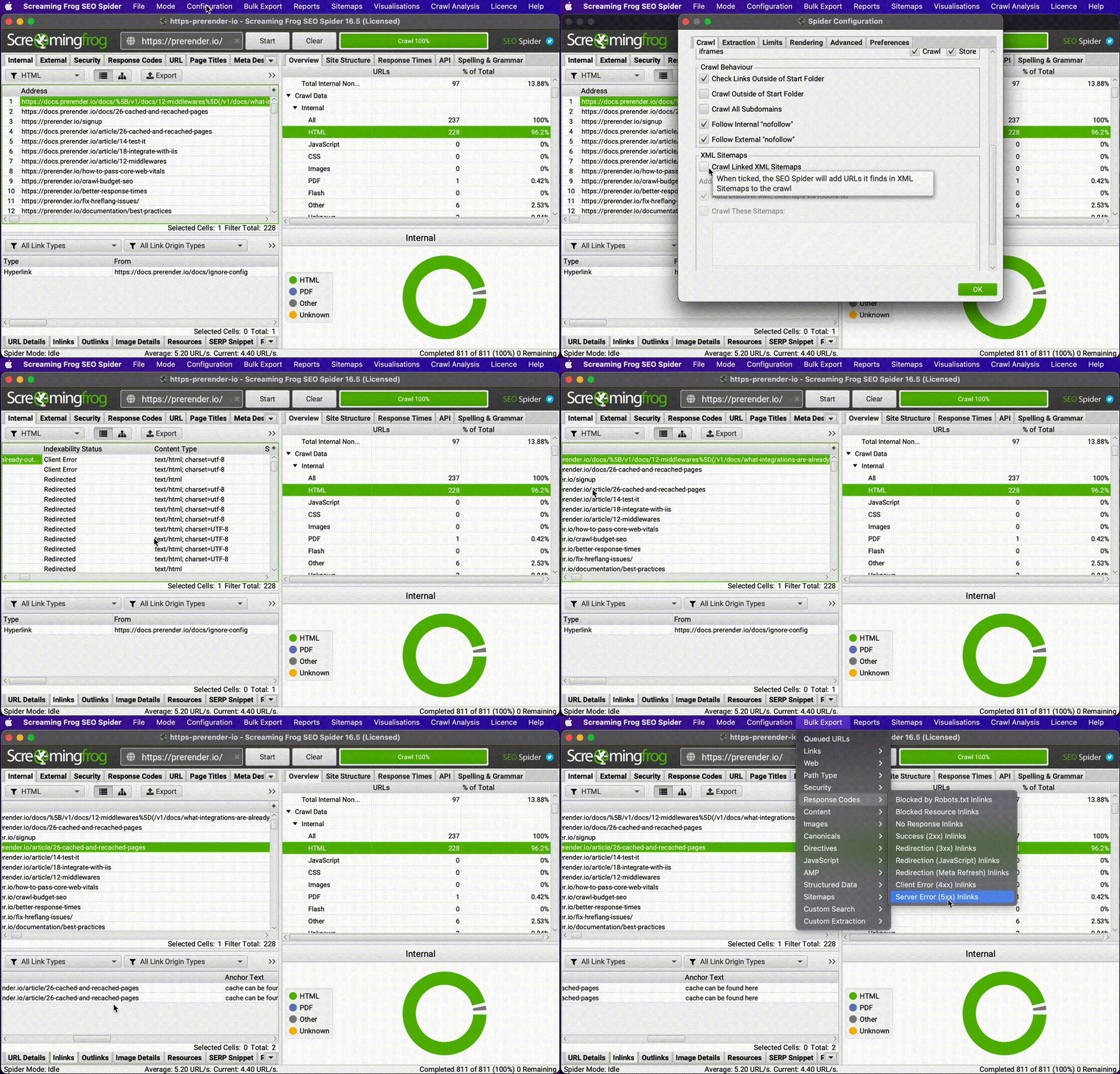
- Configure Screaming Frog to focus on HTML pages by unticking images, CSS, JavaScript in Configuration > Spider
- Run your crawl
- Sort the “Internal” tab by status code
- Export problematic links via Bulk Export > Response Codes for:
- Redirection (3xx) Inlinks
- Client Error (4xx) Inlinks
- Server Error (5xx) Inlinks
This creates a prioritized list of internal linking issues for correction. For large sites, focus first on fixing links from your most important pages (homepage, category pages, high-traffic content) to maximize the impact of your fixes.
10. Create and Debug XML Sitemaps Automatically
Challenge: Manual sitemap creation and maintenance is error-prone and time-consuming.
Solution: Use Screaming Frog to automatically generate and validate XML sitemaps.
Sitemaps help search engines discover your content, but they must be accurate and comprehensive.
To create optimal sitemaps:
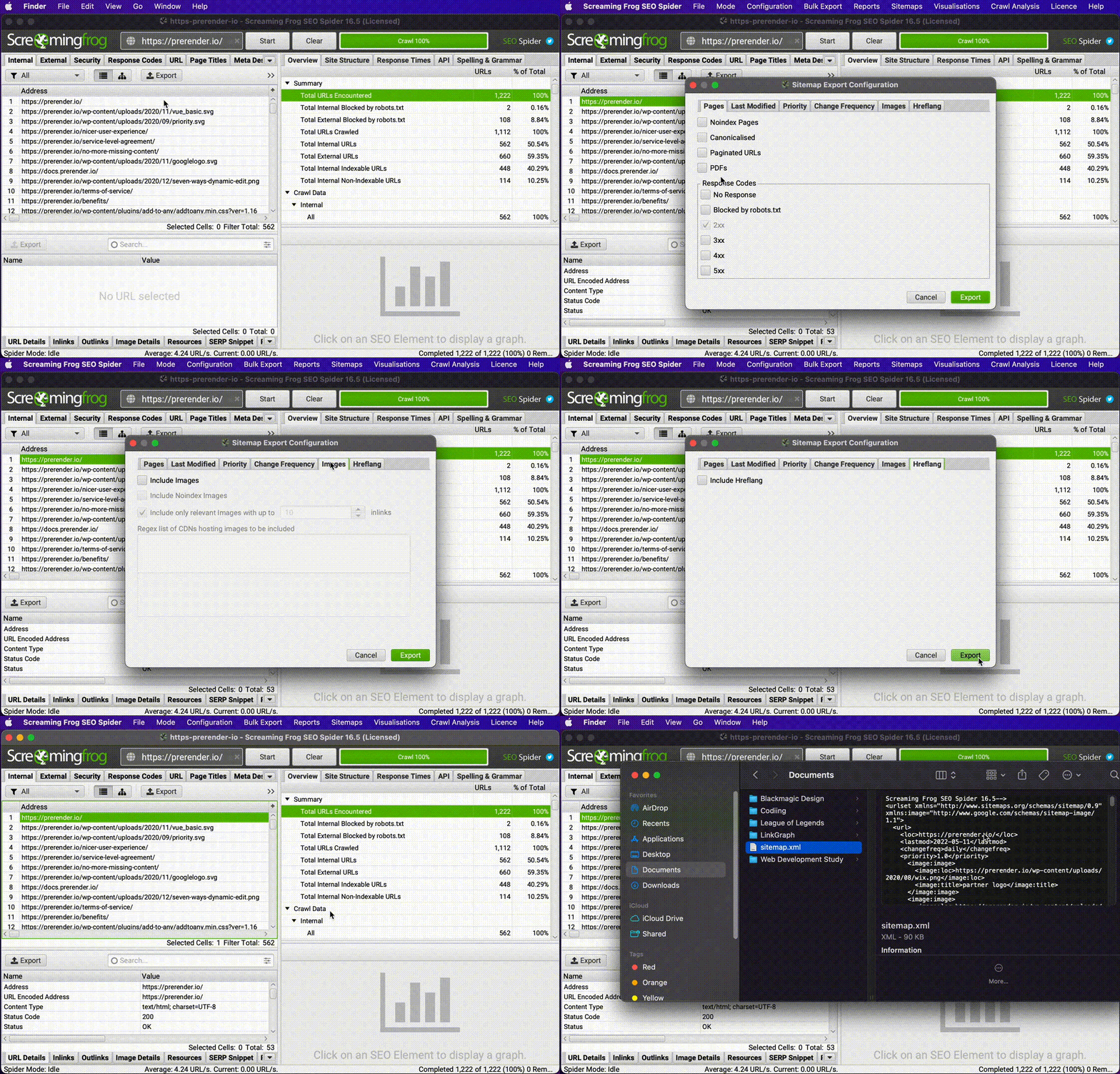
- Run a complete site crawl
- Go to Sitemaps > XML Sitemap
- Configure inclusion rules based on status code, indexability, etc.
- Generate and export your sitemap
- Alternatively, crawl an existing sitemap in List Mode to validate it
This approach ensures your sitemap only includes the appropriate URLs and contains accurate metadata like last-modified dates and priority values. For international sites, it can also properly handle hreflang annotations automatically.
11. Analyze Meta Data for Duplication and Length Issues
Challenge: Maintaining unique, properly-formatted meta titles and descriptions across large sites is difficult.
Solution: Use Screaming Frog’s built-in meta data analysis to identify and fix common issues.
Meta titles and descriptions directly impact click-through rates from search results, making them critical for SEO performance.
For comprehensive meta data auditing:
- Run your site crawl
- Navigate to the “Page Titles” and “Meta Description” tabs
- Use the filter to identify:
- Missing meta data
- Duplicate content
- Over-length titles/descriptions
- Under-length titles/descriptions
- Export problematic URLs for remediation
This systematic approach ensures all your pages have unique, properly formatted meta data that encourages clicks from search results. For e-commerce sites, combine this with custom extraction to verify that product attributes (price, availability, ratings) are properly reflected in meta descriptions.
12. Verify Analytics Implementation Across Your Site
Challenge: Missing or improperly implemented analytics code causes data gaps and inaccurate reporting.
Solution: Use custom search to verify analytics code implementation across your entire site.
Accurate analytics data is essential for making informed SEO decisions, but implementation gaps are common, especially after site updates.
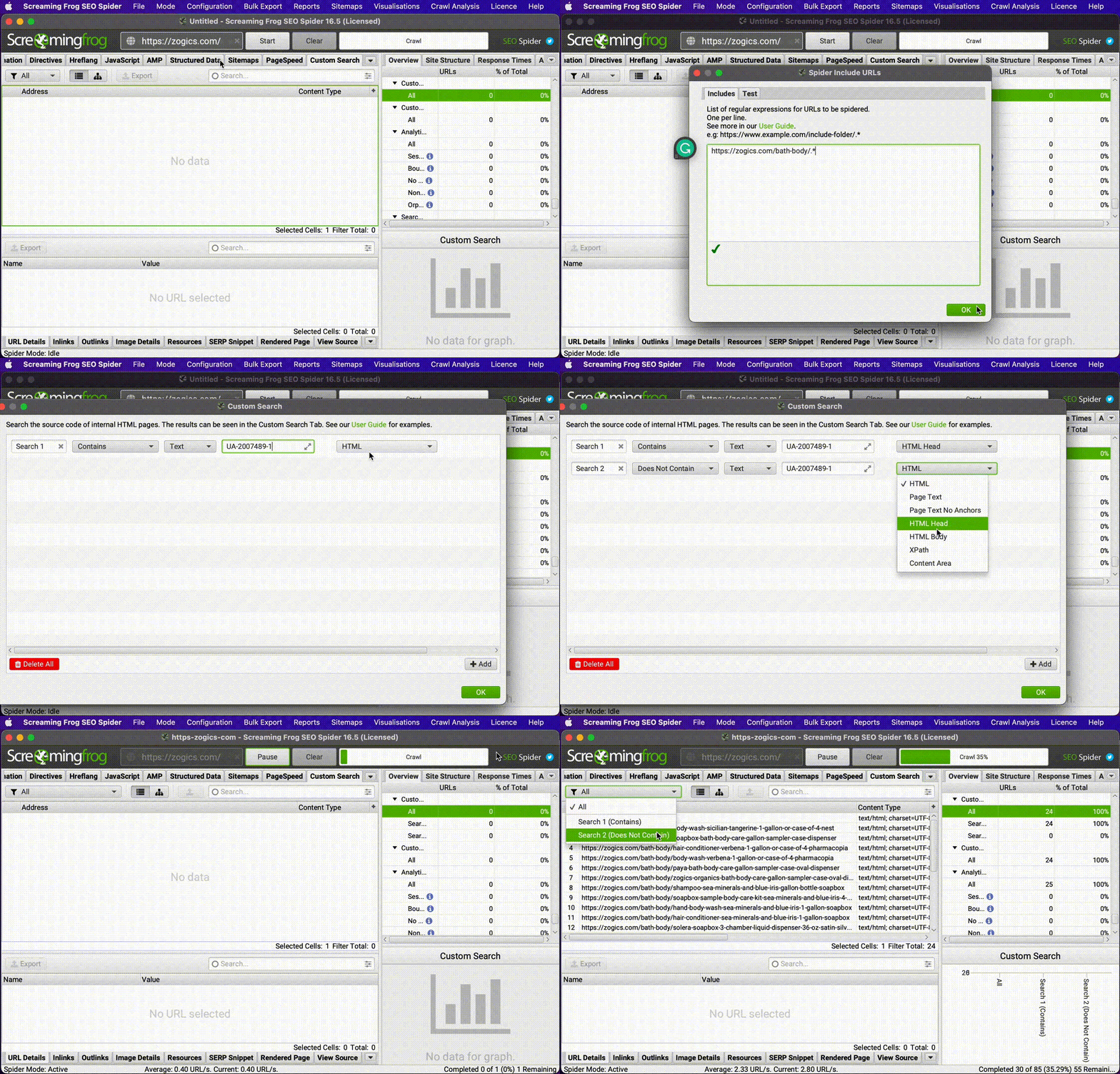
To verify analytics implementation:
- Exclude non-HTML resources in Configuration > Spider
- Add custom search filters:
- One that matches your analytics code (e.g., “UA-12345” or “G-12345”)
- Another that identifies pages missing this code
- Run your crawl
- Export pages with missing or incorrect analytics implementation
This verification ensures your analytics data accurately reflects site traffic and user behavior. For sites with complex tracking requirements, extend this approach to verify event tracking, e-commerce tracking, or other specialized implementations.
13. Identify Page Speed Issues at Scale
Challenge: Page speed affects both user experience and search rankings, but identifying slow pages at scale is challenging.
Solution: Use Screaming Frog’s Page Speed and response time data to identify performance bottlenecks.
Page speed is a critical ranking factor and user experience element. Screaming Frog offers two approaches to performance analysis:
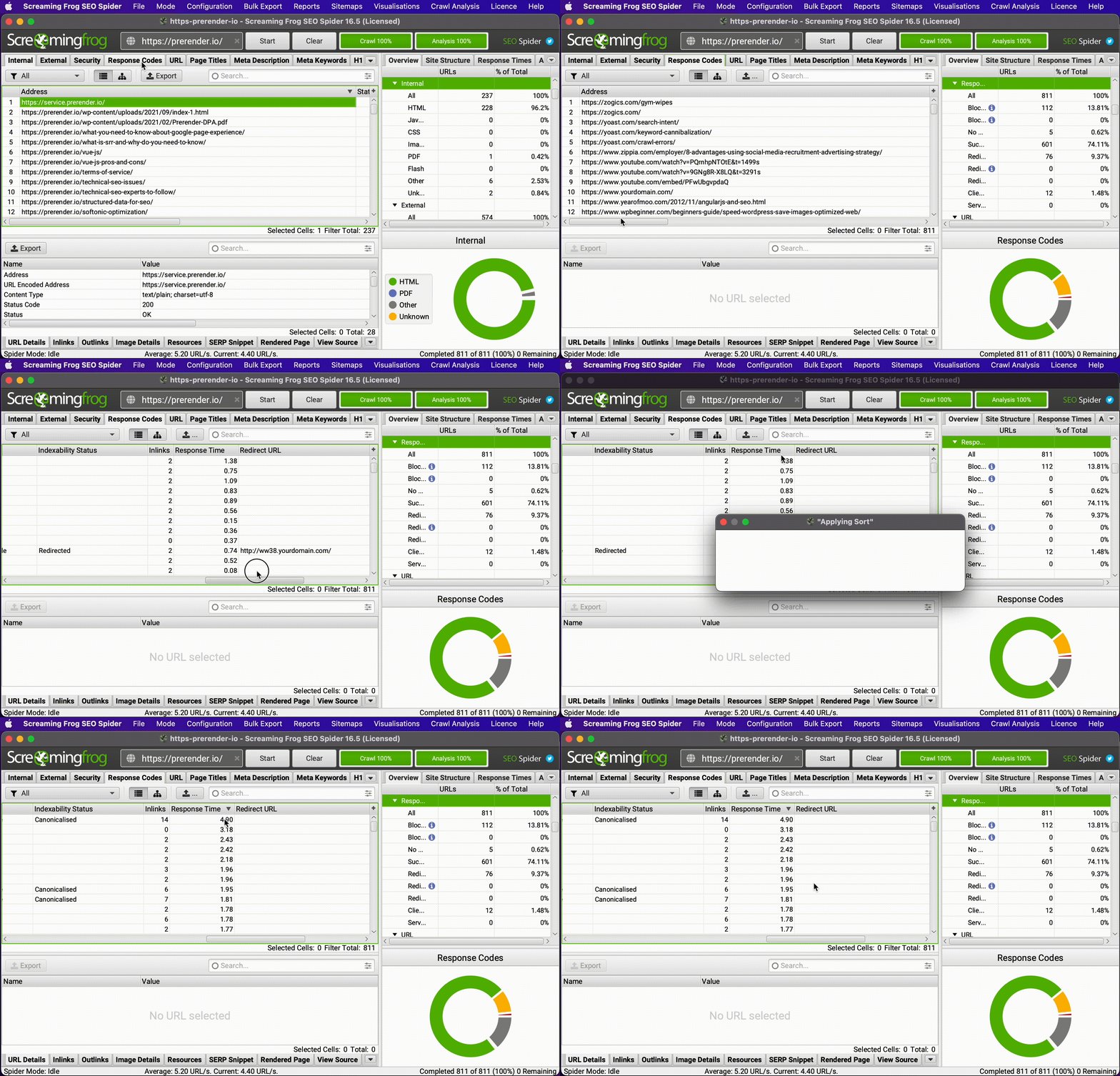
- For basic response time analysis:
- Run your crawl
- Check the “Response Time” column in the “Response Codes” tab
- Sort to identify the slowest pages
- For detailed performance metrics:
- Generate and connect a PageSpeed Insights API key
- Configure performance testing in Configuration > API Access > PageSpeed
- Analyze the detailed speed metrics in the “PageSpeed” tab after crawling
This approach helps identify specific pages and templates with performance issues for targeted optimization. For large sites, focus first on improving speed for your highest-traffic pages to maximize the impact of your optimizations.
14. Use Custom User Agents to Simulate Search Engine Crawling
Challenge: Different user agents may experience your site differently, impacting how search engines crawl and index your content.
Solution: Configure custom user agents to simulate how search engines experience your site.
Search engines use specific user agents when crawling websites, and your site might behave differently depending on the user agent.
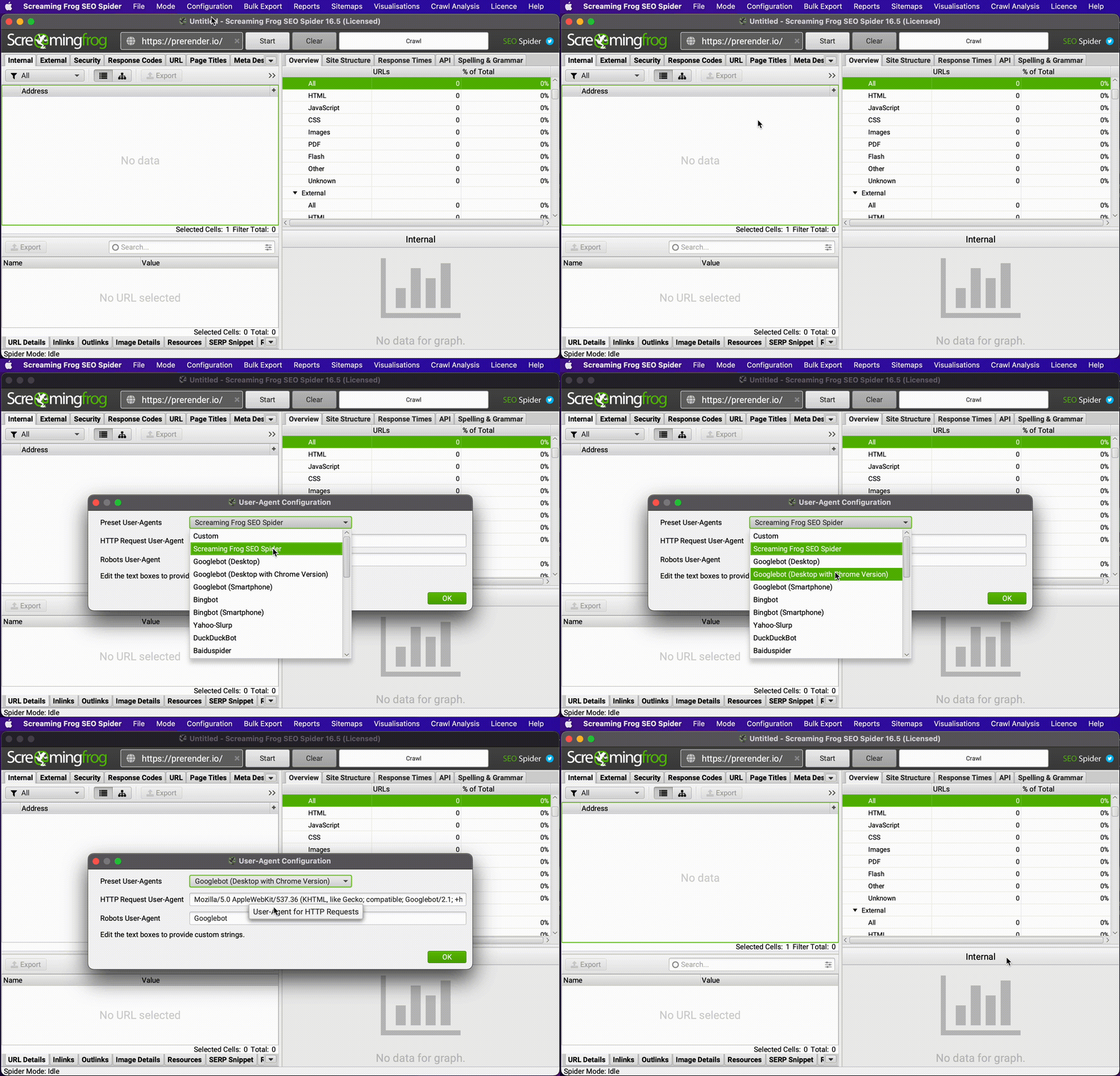
To test crawling with different user agents:
- Go to Configuration > User Agent
- Select a predefined agent (Google, Bing, etc.) or create a custom one
- Run your crawl to see how the selected crawler experiences your site
This approach helps identify cloaking issues, mobile-specific problems, or content that might be hidden from specific crawlers. For international SEO, this can be particularly useful for testing how country-specific crawlers experience your site.
15. Detect Cookie Consent and Popup Issues Affecting Content Access
Challenge: Cookie banners and popups can block content access for users and search engines.
Solution: Use custom extraction to identify intrusive elements that might impact indexing or user experience.
Modern websites often use overlays for cookie consent, newsletter signups, or other notifications. If implemented poorly, these can hide content from search engines or create poor user experiences.
To audit overlay implementation:
- Set up custom extraction to check for:
- Cookie banner code
- Newsletter popup elements
- Interstitial advertising
- Run your crawl with JavaScript rendering enabled
- Analyze how these elements appear and whether they block important content
This analysis helps ensure compliance with Google’s interstitial guidelines while maintaining proper content accessibility for both users and search engines.
Putting It All Together: Developing Your Advanced Technical SEO Workflow
The most effective technical SEO professionals don’t use these techniques in isolation—they combine them into comprehensive workflows tailored to specific site types and challenges.
Here’s how to develop your own advanced Screaming Frog workflow:
- Initial Discovery Crawl
- Use database storage for complete coverage
- Enable JavaScript rendering
- Connect analytics and Search Console APIs
- Generate a comprehensive site overview
- Targeted Issue Analysis
- Use custom extraction for specialized audits
- Implement RegEx patterns to focus on problem areas
- Apply custom filters to identify specific issues
- Export targeted reports for remediation
- Continuous Monitoring
- Schedule regular crawls of critical site sections
- Compare results over time to identify regressions
- Validate fixes from previous audits
- Monitor performance metrics for improvement
By combining these techniques into a systematic workflow, you’ll transform your technical SEO auditing from periodic spot-checks into a comprehensive, continuous improvement process. For example, you might schedule weekly crawls of high-priority sections (like product pages) while doing full technical audits monthly, with all data feeding into a central dashboard for tracking improvements.
Conclusion: Becoming a True Technical SEO Master
The difference between basic and advanced technical SEO lies not just in knowing which issues to look for, but in having systematic processes to find them efficiently at scale.
Mastering these fifteen advanced Screaming Frog techniques will:
- Save hundreds of hours on manual analysis
- Identify critical issues other SEOs miss
- Provide data-driven prioritization for fixes
- Enable continuous technical optimization
As websites grow more complex and technical SEO becomes increasingly sophisticated, these automation and analysis skills will separate true SEO professionals from the crowd.
Ready to transform your technical SEO effectiveness? Start implementing these advanced Screaming Frog techniques today—your clients will be impressed, your team will be more efficient, and your search rankings will soar.
FAQ: Advanced Screaming Frog Techniques
Is the free version of Screaming Frog sufficient for these advanced techniques?
While the free version allows basic crawling of up to 500 URLs, most advanced techniques require the paid version, which removes the URL limit and enables features like JavaScript rendering, custom extraction, and API connections.
How much technical knowledge do I need to implement these techniques?
Basic familiarity with regular expressions (RegEx) and HTML structure will help with custom extraction and filtering. For more advanced JavaScript analysis, some knowledge of how modern websites render content is beneficial.
How often should I run these advanced crawls?
For large sites, comprehensive crawls might be monthly, with targeted crawls for specific sections or issues running weekly or after major site changes. Performance monitoring and critical error checking can be automated for more frequent checks. For example, e-commerce sites often schedule daily crawls for key product categories to catch price errors or availability issues quickly.
Can Screaming Frog replace other technical SEO tools?
While incredibly powerful, Screaming Frog works best as part of a comprehensive SEO toolkit. Combine it with log analysis tools (to see actual crawler behavior), rank trackers (to measure impact), and specialized audit platforms (for deeper insights on specific issues) for complete technical SEO coverage.
How can I manage crawl data for very large websites?
Beyond using database storage, consider breaking very large sites into logical sections for separate crawls. Use the site architecture (subdomains, directories) to create manageable crawl segments that can be analyzed independently.