

Ever feel like marketing has too many moving parts and not enough hands? ChatGPT’s new Agent Mode might be the secret weapon quietly streamlining those workflows while nobody’s looking. It’s more than a chatbot – it’s like an AI intern that can browse the web, use apps, crunch data, and execute tasks on command.
Early adopters are already reclaiming hours of their week (one report cites 145 hours saved per month on average) by offloading tedious marketing chores to these AI agents. Below, we break down 15 high-impact ways savvy marketers are tapping Agent Mode to level up everything from content and campaigns to customer care. (Hint: It’s not all hype – we’ve got fresh examples and a cool startup tone to keep things fun.)
1. Dynamic Email Campaign Autopilot

Why blast 10,000 identical emails when you could send 10,000 unique ones? Agent Mode turns your email marketing into a personalized powerhouse. It can analyze your email lists and past customer interactions to craft tailored messages for each segment or each individual. Imagine an AI that skims your CRM notes and support tickets for pain points, then writes a series of outreach emails hitting exactly what each lead cares about.
One B2B team already saw response rates jump from 12% to 31% after letting an agent personalize their campaigns (while prep time shrank by 85%!). Ideal for any marketer drowning in email drafts, this use case pairs ChatGPT’s generative flair with tools like the Gmail connector to draft (and even A/B test) emails at scale.
You stay in control – reviewing or tweaking copy – but the heavy lifting of writing and segmenting is handled autonomously. The result? Higher engagement, less grunt work, and an inbox that feels like it runs itself.
2. One-Click Newsletter Writer

Your weekly newsletter just wrote itself – and it sounds like you on your best day. With Agent Mode, marketers are automating newsletter creation from content curation to final polish.
You can instruct the agent to pull the week’s top industry news, your latest blog highlights, and even a trending meme or two, then watch it weave everything into a cohesive email draft. It’s like having a robo-editor who never runs out of coffee. For content marketers and small businesses alike, this means no more Sunday nights scrambling for newsletter ideas.
The agent can gather data (e.g., scraping headlines from favorite sources or your social feeds) and then summarize, format, and even sprinkle in wit based on your brand voice. The ideal user here is the busy founder or marketer who wants a great newsletter but lacks the hours. Agent Mode churns out a solid first draft in minutes. Bonus: Provide a few past newsletters as examples, and it will mimic the style so well that readers will think you hired a professional copywriter (when you had an AI on autopilot).
3. CRM Sync and Lead Enrichment

Messy CRM, meet your new data cleanup crew. If your customer database is full of gaps (missing emails, outdated titles, duplicate entries), Agent Mode can step in as a diligent marketing ops assistant. In one experiment, a user had the agent update a lead list spreadsheet, checking each company’s website and verifying contact emails automatically.
The current Agent Mode can’t natively log into your proprietary CRM yet, but it can use web-based tools (like Google Sheets or online CRM portals) to cross-check info, fill blanks, and flag inconsistencies. For example, feed it a list of companies and it will visit each website to pull the latest contact info or social links. It might even note if a company changed its name or if an email format looks dodgy.
Ideal for marketing teams and SMBs that can’t afford data decay – the agent ensures your campaigns aren’t derailed by bad info. And with upcoming integrations, we’re likely to see full CRM syncing soon (imagine auto-updating lead statuses after an email campaign). In short, Agent Mode is the data whisperer that keeps your lead pipeline clean, accurate, and ready to convert.
See Related: Ultimate Guide to Digital Marketing in the Age of AI (Edition)
4. LinkedIn Lead Generation Assistant

Hate cold prospecting? Let an agent warm up those leads for you. This use case turns ChatGPT Agent into an AI sales development rep that scours LinkedIn (and the web) to build targeted lead lists and even drafts opening outreach messages. For example, you can ask it to “Find 50 ecommerce directors at mid-size fashion retailers in Europe, and prepare a personalized LinkedIn invite for each.”
The agent will scrape publicly available info – names, positions, company details – then use that context to generate tailored connection requests or intro emails. Marketers are already toying with this: one prompt had Agent Mode combine scraping + templating to find contacts and draft custom invites, essentially automating the first steps of outreach. The ideal user is a B2B marketer or agency doing lead gen at scale without a big research team.
How it works: Agent Mode’s browser tool can navigate LinkedIn search results or company staff pages, gather the data, then its GPT brain works out an engaging, non-generic message for each prospect (“Hi Jane, noticed your brand’s expanding into sustainable apparel – loved your recent webinar on supply chain transparency…”). You, of course, approve the messages, but gone are the days of copy-pasting templates. It’s smarter spray-and-pray – more like snipe and score.
5. SEO Content Ideation & Outline Generator

Content ideas running dry? Your AI intern already did the keyword homework. In the SEO arena, Agent Mode shines as a research assistant that can sniff out high-value topics and sketch your next blog post outline in one go.
Instead of spending hours with keyword tools and competitor blogs, you can ask the agent something like: “Find me five long-tail keywords our site could rank for in [your niche], analyze the top-ranking content, and draft a detailed outline for an article that would beat them.” The agent will browse Google, identify what questions people are asking, check competitors’ articles, and pinpoint content gaps you can exploit. It might say: “I see others talk about X and Y, but nobody has addressed Z – let’s build your piece around that.”
Ideal for content marketers and SEO specialists, this usage means instant inspiration backed by data. The outlines it produces come complete with potential headings, key points to cover, and even references to include.
You get the strategic roadmap for a killer article handed to you in minutes. By leveraging ChatGPT’s deep research mode alongside its web browser, Agent Mode acts like an SEO strategist on demand – one that never runs out of fresh ideas or angles.
6. Hands-Free Content Creation and Optimization

That blog post idea you had at lunch? It could be drafted, edited, and SEO-optimized by dinner. Agent Mode isn’t just brainstorming outlines – it can take a piece from blank page to polished draft with astonishing efficiency. Consider the “content production pipeline” some teams have built: the agent expands your outline into a full article, inserts relevant stats or quotes pulled from the web, adjusts the tone to fit your brand, and even checks SEO basics like keyword usage and meta descriptions.
The payoff is enormous: one digital agency used agents to scale from 5 articles per month to 50 high-quality pieces with the same human team. The trick is treating the AI as a junior writer: you give it clear instructions and let it generate a draft, then you do a quick editorial pass. It can also run an optimization check, for example, analyzing readability or ensuring the keyword appears in key spots, and fix those automatically.
The ideal user here is any content marketer or business owner who needs 10x more content but can’t 10x their headcount. With Agent Mode, your content calendar can be filled weeks in advance.
It’s not about replacing writers; it’s about giving your writers a robotic supercharger so they can focus on creativity and strategy while the AI handles the grunt work of researching and initial copy. (Pro tip: Have the agent suggest 2-3 title options and social media blurbs for each piece – you’ll get SEO-friendly titles and ready-to-go tweets without breaking a sweat.)
7. Cross-Channel Content Repurposing

One piece of content, five different platforms – no sweat for Agent Mode. This use case is all about squeezing more juice from the content you already have. Let’s say you wrote a killer blog post or a whitepaper.
With a single prompt, your AI agent can turn that long-form piece into a Twitter thread, a LinkedIn article summary, an Instagram carousel outline, a script for a short TikTok video, and even an email snippet. Content creators often face endless reformatting tasks as they adapt material across channels, and this is where the agent becomes a godsend. It knows the nuances – it will preserve your brand voice but tweak the style for each platform (e.g. punchy one-liners and hashtags for Twitter, storytelling tone for LinkedIn, visual cues for Instagram).
One agency that implemented this cross-posting workflow managed to pump out over 1,000+ repurposed pieces a month across client accounts, about 10× faster than doing it manually. And engagement didn’t skip a beat – the AI-adapted posts pulled in roughly 87% of the engagement of original handcrafted ones.
The bottom line: your team creates one core piece, and Agent Mode explodes it into a full-blown multichannel campaign. For lean marketing teams in particular, this is like cloning your content strategist into five specialist roles at once (without paying five salaries).
8. Automated Competitor Intelligence Reports
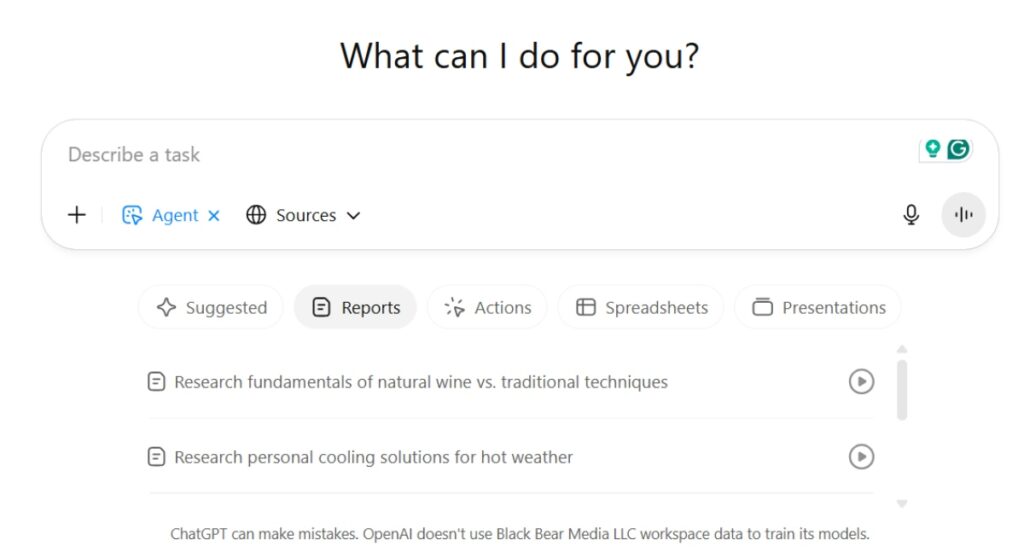
Your competitor changed their pricing at 3 AM – guess who noticed while you slept? ChatGPT Agent Mode. Keeping tabs on competitors is a never-ending task, but an AI agent can do it obsessively and deliver insights on a silver platter.
Marketers are deploying agents as automated sleuths that visit competitor websites daily, scrape pricing or feature pages, log changes, and even screenshot new promos. By the end of the week, you get a neat report: “Competitor A launched a new plan, Competitor B tweaked their homepage messaging, Competitor C’s product page is down” – all compiled without lifting a finger. A typical setup might have the agent track 5–10 key competitors, extracting structured data (prices, feature lists, headlines) and highlighting what changed from last week.
The time savings are massive – what used to be a full day of manual research can be done in 25 minutes by an agent. And accuracy is high (reports show ~94% data accuracy in these AI-gathered intel briefs). The real magic comes from analysis: the agent doesn’t just dump data; it can point out trends (“three competitors raised prices this month”) and even suggest opportunities.
One SaaS company credits its agent-powered competitive analysis with uncovering a market gap that led to a $2M revenue opportunity. In short, Agent Mode gives you eyes on the market 24/7 – a strategic edge for any marketing team that wants to move faster than the competition.
9. PPC Ad Copy and Budget Assistant

Tired of staring at Google Ads dashboards and spinning up new copy ideas? Give those chores to the agent. In paid advertising, small optimizations can mean big dollars, and ChatGPT’s agent is being used as an on-demand PPC assistant. One powerful move is generating heaps of new ad copy variations in seconds.
Provide a landing page or product description, and have the agent produce 5 new headlines and 5 new ad texts tailored to different angles (e.g., one focusing on price, one on quality, one on urgency). It’s like brainstorming with a creative team of one super-intelligent machine. You can even instruct the agent to follow best practices – character limits, using a keyword in the headline, adding a clear CTA – and it will output ready-to-run ads.
But Agent Mode doesn’t stop at copy; it can help with analysis too. For example, you might download your latest PPC performance report as CSV, give it to the agent (via the code interpreter or by having it open the file in its virtual environment), and ask for insights.
In minutes, it might say, “Campaign 3 has a CPA 20% higher than the rest; consider pausing Keyword X and reallocating budget to Keyword Y which has a better conversion rate.” Essentially, the agent can play analyst by crunching numbers and visualizing trends for you.
While it won’t click the “optimize” button in Google Ads (you still have that control), it will surface low-hanging fruit and creative refreshes faster than any human. For anyone managing PPC – from solo entrepreneurs to agency account managers – this means more creative testing and quicker fixes, without the usual mental drain.
See Related: How to Optimize Your Blog Posts for SEO: 10 Essential Tips
10. Rapid Market Research & Trend Analysis

Need to spot a trend or digest 10,000 survey responses by EOD? Agent Mode is on the case. Market research often involves sifting through mountains of information – industry reports, customer feedback, social media chatter, you name it. ChatGPT’s agent can turbo-charge this process by doing in hours what a research team might do in weeks.
For instance, you could task it with, “Analyze the past year of Reddit and Twitter mentions about [your product category] and tell me the top 5 emerging consumer pain points.” The agent will roam the web, reading posts and comments (within the scope you allow), and come back with a succinct analysis like a seasoned research analyst.
It can also handle data directly: imagine you have thousands of survey responses in a Google Sheet – the agent can connect, parse sentiments and common themes, and give you a readable summary (“40% of customers mention price as a concern, 25% mention feature A lacking, etc.”). Traditional research firms are probably sweating, because this AI doesn’t just work fast – it’s thorough and operates at a fraction of the cost.
Ideal for marketing strategists and product marketers, Agent Mode helps answer questions like “Where is the market going?” or “What do customers want?” without the usual legwork. And since it can cite sources, you can double-check any surprising insight.
In a world where jumping on trends early is key, having an agent do your trendspotting means you get a head start. Think of it as your always-on analyst that never gets tired of reading reports and forums – it just delivers clarity amid chaos.
11. Auto-Generated Reports & Slide Decks

That Monday morning marketing report – let your agent handle the number-crunching and PowerPoint-ing. This is the dream of every marketer who’s spent late nights polishing slides: feed data in, get a presentation out. With Agent Mode’s ability to use tools and format content, it’s becoming a reality.
For example, you can instruct: “Pull our website analytics and ad campaign results for July from this spreadsheet, and produce a 10-slide presentation with charts and key takeaways.” ChatGPT will happily comply: it can read the data, create summaries (“Website traffic up 15%, conversions steady, Ads ROI improved 20%”), and even generate simple graphs or slide outlines to visualize it.
In one real-world test, an agent assembled a multi-slide deck from a KPI sheet, complete with color-coding and structured highlights. Marketers say this is where the agent shines: it’s like having a data analyst and a graphic designer on call.
While you might need to fine-tune the final style, the bulk of tedious work – gathering metrics, writing analysis, laying out slides – is done in minutes. The ideal users are marketing managers preparing weekly reports, agencies creating client reports, or startup founders updating investors. Instead of wrestling with Excel and PowerPoint every reporting cycle, you spend that time on strategy and let the AI spit out the first draft of the report.
It’s faster and often surprisingly insightful (the agent might notice a metric change you hadn’t). Plus, because it keeps the context of past data, you can even ask comparisons like “how does this month compare to last month,” and it will narrate the story. In short, Agent Mode turns data into decisions and decks, so you can impress the bosses or clients with minimal sweat.
12. Customer Service Triage & Response

500 support emails in your inbox? Agent Mode isn’t even breaking a sweat. For companies drowning in customer inquiries, ChatGPT’s agent can act as an AI-powered support rep that never sleeps. This goes way beyond those clunky chatbots.
An Agent-Mode assistant can read incoming emails or tickets, understand the customer’s issue (by referencing your knowledge base or past ticket history), and draft a personalized response in your brand’s tone. Routine questions (“How do I reset my password?” or “Where’s my order?”) can be answered end-to-end by the agent pulling info from the right sources.
More complex issues get flagged for a human, but even then the agent provides a handy summary and suggested solution to your support team. The impact is huge: companies testing this have seen first-contact resolution improve by 67% and support volumes that would normally swamp a human team are handled with ease.
One telecom firm had an agent handling 10,000+ inquiries a day with an 89% customer satisfaction rating – basically, the AI took on the bulk of repetitive questions while humans focused on thornier problems. For digital marketers, this matters because customer experience is part of your brand.
Agent Mode ensures quick, accurate answers (it literally scans all relevant docs to get the facts straight) and it can even detect sentiment – if a customer is frustrated, the AI’s tone adjusts to be extra empathetic. The ideal scenario is a hybrid workflow: the agent drafts replies and handles simple cases, humans supervise and finalize as needed.
This augmented support not only saves countless hours but also means leads and customers get faster responses. Happier customers = better retention and conversion, and your team doesn’t burn out on answering the same question 100 times. It’s like giving your support team a genius sidekick who never complains about doing the boring stuff.
13. Content Refresh and SEO Maintenance

Old content dragging down your SEO? Agent Mode can refresh a year’s worth of blog posts before lunch. Every digital marketer knows the pain of maintaining content: statistics get stale, links break, best practices evolve – but who has time to audit dozens or hundreds of pages? Enter the agent.
You can instruct ChatGPT’s Agent Mode to perform a content audit on your site: it will crawl specified pages (using its browser tool), check for outdated info (like “2023” in an article that could be updated to 2025 data), click links to see if they 404, and even compare the on-page SEO of your content against current top search results. Once it spots opportunities, it can automatically make suggestions or drafts for updates.
For instance, if an old blog post says “Instagram has 1 billion users” and now the number is higher, the agent can find the latest figure and recommend inserting it along with the source. It might also detect that Competitor X’s article on the same topic added a new section last month, clueing you in that your post needs an extra paragraph to stay competitive.
This is ideal for content marketers and SEO teams who want to protect their rankings without manually re-reading everything quarterly. The agent essentially does a continuous QA on your content library.
How it works: you give it guidelines (“flag anything older than 2 years or any stat that looks outdated; suggest new title tags if possible”), and it will produce a report of fixes. In many cases, you can even have it draft the updated text for you to review. The result is a fresher, more authoritative site with minimal manual effort.
No more “annual content spring cleaning” dread – your AI assistant handles it incrementally. And Google rewards the freshness and accuracy boosts, helping your SEO in the long run. It’s like having a vigilant editor-bot that never lets your content age ungracefully.
14. Influencer Vetting and Outreach Prep

Think that an Instagram micro-influencer is a perfect fit? Let the agent double-check their credentials before you sign. In the world of influencer marketing, not all that glitters (in follower count) is gold.
ChatGPT Agent Mode can help you audit an influencer’s real influence. Give it a public social profile handle, and it can scrape key metrics – recent posts, likes, comments, engagement ratios – and even analyze for red flags (e.g. lots of followers but very few comments might indicate fake followers).
One suggested Agent task was exactly this: “Audit an Instagram handle for engagement & red flags”, using a combo of web scraping and reasoning. The agent could report things like: “User @Fashionista123 averages 2% engagement (industry avg ~3%), comments seem genuine (no obvious bot spam), but there was a sudden 5K follower spike last week – possible giveaway or fake followers.”
This kind of insight is invaluable before you invest in a partnership. Additionally, Agent Mode can draft your outreach messages to the influencer, tailored to their style. It might note details like a recent post or shared interest to mention, making your pitch more authentic.
For marketers at agencies or small businesses doing influencer collaborations, this AI helper speeds up due diligence dramatically. No need to manually scroll through 100 posts – the agent does it and even summarizes sentiment (were the comments mostly positive? did any post cause backlash?).
You get a quick dossier: Is this person on-brand and worth it? This saves time and potentially saves money by avoiding influencer duds.
Once vetted, you can have the agent generate a friendly outreach email or DM that doesn’t sound cookie-cutter. It’s like giving your PR team an automated research assistant that ensures you only work with influencers who influence, and helps you approach them with the right tone. Win-win.
See Related: ChatGPT’s Stylistic Quirks: How to Make Your AI-Written Content Unique
15. End-to-End Campaign “Agent Chain” Execution
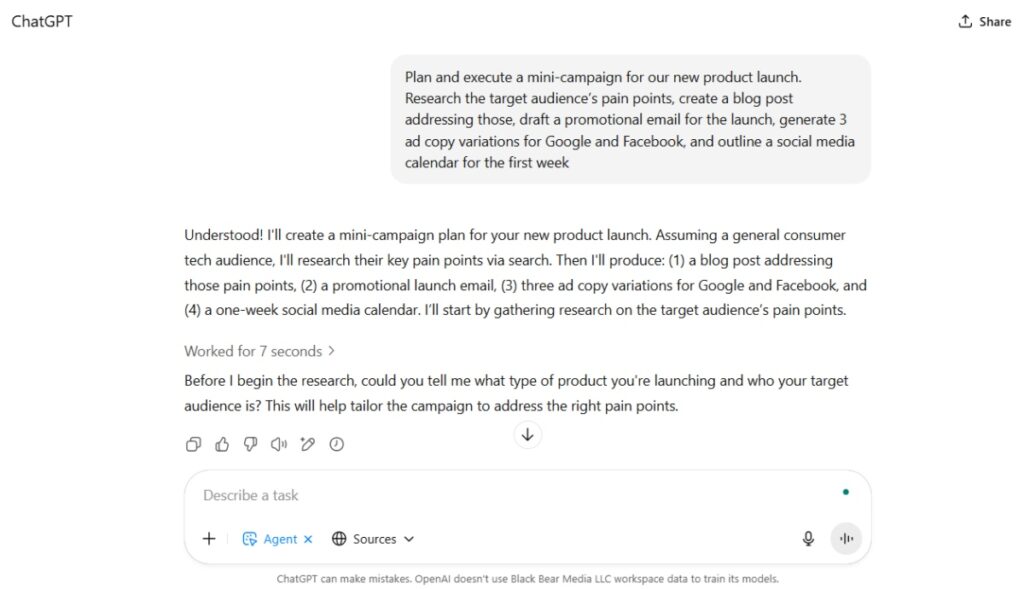
What if you could launch an entire marketing campaign – research, content, emails, ads – with one instruction? That’s the holy grail many are experimenting with using Agent Mode’s ability to chain tasks. Think of this as your all-in-one campaign concierge.
You might prompt: “Plan and execute a mini-campaign for our new product launch. Research the target audience’s pain points, create a blog post addressing those, draft a promotional email for the launch, generate 3 ad copy variations for Google and Facebook, and outline a social media calendar for the first week.”
Then watch as the agent multitasks like a boss: it will likely break down the work–first doing the research (web browsing for audience insights), then writing the blog post, then the email, then the ads, then the social plan. Along the way, it keeps context, so the messaging stays consistent.
This kind of prompt chaining is where Agent Mode blurs the line between individual use cases and full campaign automation. It’s ideal for solopreneurs or small teams who wear many hats – the agent essentially becomes a temporary team of specialists working in tandem.
In practice, you’d still review each deliverable, but the initial output comes astonishingly fast. Early users report mixed results (it’s a lot to ask perfectly in one go), but when it works, it feels like magic.
One example: a marketer had the agent assemble a multi-channel campaign, and it delivered a decent blog draft, an email, and a set of social posts in one session – all coherent and on-message. The trick is giving clear instructions and allowing the agent to ask clarifying questions (which it will, if something is ambiguous).
As Agent Mode evolves, this “campaign chaining” could quietly revolutionize how marketing teams operate: your AI handles the grunt work across channels in a coordinated way, while you provide the strategic oversight. It’s like having an autonomous mini-agency at your command, ready to execute the game plan from start to finish. Not quite set-and-forget – but pretty close to set-and-wow.
Conclusion: Digital marketing is changing fast, and the quiet rise of ChatGPT’s Agent Mode is proof that parts of our workflow can be handled by smart, tireless AI assistants. From writing emails and content to analyzing data and managing customer touchpoints, these 15 applications show Agent Mode as an energized, clever, startup-savvy ally for marketers.
The tone may be cool and the tech cutting-edge, but the results are very real: saved time, improved performance, and more room for you to focus on strategy and creativity (the things that truly require a human touch). Give some of these Agent Mode use cases a try – you might just find your new favorite “team member” is an AI running in the background, quietly boosting your marketing game while you take the credit. The future of marketing isn’t just human vs. AI, it’s humans with AI – and right now, Agent Mode is one powerful way to get in on the action.